Overwhelmed by Priorities? Task Prioritization Keeps You Focused on What Matters Most.

"I worked all day, but somehow nothing important got done."
If you've ever ended your workday with this thought, you're not alone.
Most professionals don't struggle because they have too much work. They struggle because everything feels equally important.
Your inbox is full. Your team needs updates. Meetings keep appearing on your calendar. Clients are waiting. New ideas pop into your head every hour. By the time you finish responding to urgent requests, the work that actually moves your goals forward is still waiting.
This is where task prioritization changes everything.
Successful people don't work more hours. They work on the right things at the right time.
When you know what deserves your attention first, your stress decreases, your productivity increases, and your work starts creating real results instead of just keeping you busy.
Let's understand how task prioritization works, why it matters, and how AI-powered tools like ClickUp make it easier than ever.
What Is Task Prioritization?
Task prioritization is the process of deciding what should be done first, what can wait, and what doesn't need your attention at all.
Instead of treating every task the same, you organize your work based on importance, urgency, business impact, deadlines, and available resources.
Think about your daily task list.
It may include:
Replying to emails
Preparing a client proposal
Updating project documents
Reviewing teamwork
Planning next month's strategy
Attending meetings
Are all these tasks equally important?
No.
Prioritization helps you separate important work from busy work.
When you consistently focus on high-value activities, your productivity improves naturally.
Why Does Task Prioritization Matter?
Without priorities, work becomes reactive.
Instead of controlling your day, your day controls you.
Here are the biggest reasons prioritization matters.
It Reduces Stress
One of the biggest causes of workplace stress is uncertainty.
When you don't know where to start, every task feels urgent.
A clear priority list removes decision fatigue and gives your mind a clear direction.
It Helps You Meet Deadlines
Late projects rarely happen because people are lazy.
Most deadlines are missed because teams spend too much time on lower-value work.
Prioritization ensures important deliverables receive attention before it's too late.
It Improves Team Collaboration
When everyone understands which tasks matter most, teams stop competing for attention.
Managers can assign resources better, remove blockers faster, and keep projects moving smoothly.
It Increases Business Results
Completing twenty low-impact tasks doesn't create the same value as completing one high-impact task.
Prioritization keeps your focus on activities that generate revenue, improve customer satisfaction, or move strategic goals forward.
It Creates Better Work-Life Balance
When important work gets finished on time, there's less need for overtime.
You stop carrying unfinished work into evenings and weekends.
How to Prioritize Tasks Effectively
Prioritizing tasks is not about completing the longest to-do list—it's about focusing on the work that creates the biggest impact. A good prioritization process helps you stay organized, reduce stress, meet deadlines, and make better use of your time. By following a few simple steps, you can work more efficiently and avoid feeling overwhelmed.

Start with a Complete Task List
Begin by writing down every task you need to complete. Keeping everything in one place gives you a clear picture of your workload and prevents important tasks from being forgotten.
Identify the Most Important Tasks
Review your list and identify the tasks that directly support your goals or have the greatest business impact. Completing these high-priority tasks first ensures that your time is spent on meaningful work rather than low-value activities.
Consider Deadlines and Dependencies
Look at due dates and check whether any tasks depend on others being completed first. Prioritizing time-sensitive work helps you avoid last-minute pressure and keeps projects moving smoothly.
Break Large Tasks into Smaller Steps
Large projects can seem difficult to start. Breaking them into smaller, manageable tasks makes them easier to complete and helps you track progress without feeling overwhelmed.
Use a Prioritization Method
Apply a proven method such as the Eisenhower Matrix, ABC Method, or MoSCoW Method to organize your tasks based on urgency, importance, and value. A structured approach removes guesswork and makes decision-making faster.
Review and Update Your Priorities Regularly
Your workload can change throughout the day as new requests or deadlines appear. Take a few minutes each morning or at the end of the day to review your task list and adjust priorities. Regular reviews help you stay focused on the most important work and keep your projects on track.
Popular Task Prioritization Methods
There is no one-size-fits-all approach to prioritizing tasks. Different methods work better for different people and projects. The goal is to focus on the work that creates the most value while avoiding unnecessary distractions.
The Eisenhower Matrix
The Eisenhower Matrix helps you organize tasks based on their urgency and importance. Instead of treating every task as a top priority, it divides your work into four categories:
Urgent and Important: Complete these immediately, such as meeting deadlines or handling critical issues.
Important but Not Urgent: Schedule these tasks, like planning, learning new skills, or improving processes.
Urgent but Less Important: Delegate these tasks whenever possible, such as routine emails or administrative work.
Neither Urgent nor Important: Reduce or eliminate these activities because they add little value.
This method helps you focus on meaningful work instead of constantly reacting to urgent requests.
ABC Method
The ABC Method is a simple way to rank your daily tasks by importance.
A: Must be completed today because they have the biggest impact.
B: Important tasks that can be completed after "A" tasks.
C: Nice-to-have tasks that can wait if time is limited.
This method is easy to use and works well for individuals and small teams.
MoSCoW Method
The MoSCoW Method is commonly used in project management to decide which tasks or features should be completed first.
Must Have: Essential tasks that cannot be skipped.
Should Have: Important tasks that improve the project but are not critical.
Could Have: Optional tasks that add extra value.
Won't Have: Tasks that are postponed for a future phase.
This approach keeps projects focused and prevents teams from taking on too much work at once.
Value vs. Effort Method
The Value vs. Effort Method helps you choose tasks by comparing the value they deliver with the effort required to complete them.
High Value, Low Effort: Complete these first because they provide quick wins.
High Value, High Effort: Plan these carefully as they offer significant long-term benefits.
Low Value, High Effort: Consider delaying or removing these tasks.
This method helps you spend more time on activities that produce the greatest results.
Common Mistakes That Destroy Productivity
Even with a good system, these mistakes can reduce effectiveness.
Trying to do everything at once
Constant multitasking
Saying yes to every request
Ignoring long-term projects
Never reviewing priorities
Working only on urgent tasks
Spending too much time in meetings
Keeping everything inside your head instead of using a task management system
Avoiding these habits can dramatically improve daily productivity.
Benefits of Task Prioritization
Organizations that prioritize work consistently experience measurable improvements.
Some of the biggest benefits include:
Better Focus
You spend less time deciding what to do and more time completing meaningful work.
Faster Decision-Making
Clear priorities reduce hesitation.
Higher Productivity
Energy goes toward tasks that create results instead of distractions.
Improved Project Success
Projects stay on schedule because critical work gets completed first.
Better Resource Management
Managers allocate people, budgets, and time more effectively.
Stronger Team Accountability
Everyone understands responsibilities and deadlines.
Less Burnout
Employees experience fewer last-minute emergencies and less workplace stress.
Better Customer Experience
Important client work receives attention first, leading to faster responses and better service.
Why ClickUp Is the Best Tool for Task Prioritization
Managing priorities becomes much easier when you have the right tool. While many project management platforms help you create task lists, ClickUp goes a step further by combining task management, project planning, collaboration, automation, and AI-powered features in one workspace. This means you don't have to switch between multiple apps to stay organized.
Whether you're working alone, managing a small team, or leading large projects, ClickUp helps you identify what needs attention first, track progress, and keep everyone aligned. Its flexible features make it easy to organize work based on deadlines, importance, and team capacity, helping you focus on high-impact tasks instead of getting lost in busy work.
Here are some of the features that make ClickUp one of the best tools for task prioritization.
Custom Priority Levels
ClickUp allows you to assign priority levels such as Urgent, High, Normal, and Low to every task. This helps team members instantly understand which tasks need immediate attention and which can be completed later.
Multiple Task Views
Everyone has a different way of organizing work. ClickUp offers multiple views, including List, Board, Calendar, Timeline, Gantt, and Workload View, allowing you to see your priorities in the format that works best for you.

Goals and Task Dependencies
You can connect daily tasks to larger business goals and create task dependencies, ensuring work is completed in the correct order. This prevents delays and keeps projects moving smoothly.

Automation
ClickUp automates repetitive tasks such as assigning work, updating task statuses, sending reminders, and notifying team members. This reduces manual effort and helps teams focus on more important work.

Real-Time Collaboration
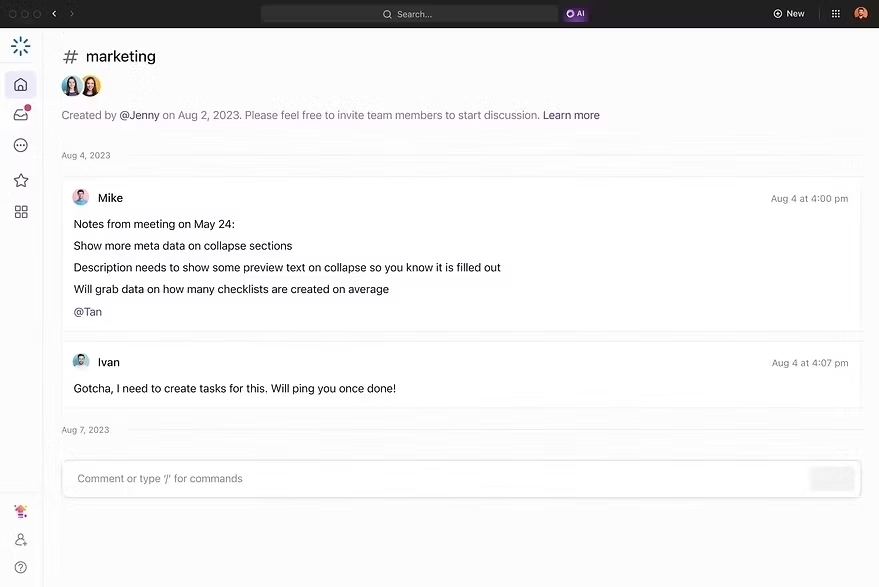
Team members can comment on tasks, share files, edit documents, and communicate within the same workspace. Keeping everything in one place improves collaboration and reduces confusion.
Dashboards and Progress Tracking
Custom dashboards provide a real-time overview of project progress, workloads, deadlines, and high-priority tasks. Managers can quickly identify bottlenecks and make informed decisions without manually collecting updates.

Seamless Integrations
ClickUp integrates with many popular business tools, allowing teams to connect their existing workflows while managing priorities from a single platform. This creates a more organized and efficient work environment.

If you want to learn more about ClickUp and Productivity Management, you can connect with ME on LinkedIn.
Comparison of ClickUp with Other Productivity Tools
There are many productivity and project management tools available today, and each offers useful features for different types of teams. Some focus on simple task management, while others are better for visual project tracking or documentation. However, many businesses end up using multiple tools to manage tasks, share documents, track time, and automate workflows.
ClickUp brings all of these capabilities together in one platform. It combines task management, project planning, collaboration, documentation, dashboards, automation, and AI-powered features, helping teams work more efficiently without constantly switching between different applications. For businesses looking for an all-in-one productivity solution, ClickUp provides the flexibility and scalability needed to support both small teams and large organizations.
Here's the full Comparison of ClickUp with other tools.
AI Is Changing How We Prioritize Work
Traditional prioritization depends on human judgment.
AI adds another layer of intelligence.
Instead of simply showing task lists, AI can:
Predict delays before they happen.
Identify overloaded team members.
Suggest better schedules.
Recommend task priorities.
Generate project summaries.
Automate repetitive administrative work.
Help managers make faster decisions.
As AI continues evolving, prioritization will become more proactive rather than reactive.
The teams that adopt AI-powered productivity tools today will gain a significant competitive advantage tomorrow.
The Real Secret Isn't Doing More—It's Doing What Matters Most
Being busy has never been the goal.
Creating meaningful results is.
Task prioritization helps you focus your energy where it creates the greatest impact. Combined with AI-powered project management, it removes guesswork, reduces stress, and allows individuals and teams to accomplish more without working longer hours.
Among today's productivity platforms, ClickUp stands out because it brings task management, collaboration, automation, reporting, documentation, and AI together in one powerful workspace. It doesn't just help you organize work—it helps you make smarter decisions every day.
If you want to stop feeling overwhelmed and start working with clarity, better prioritization is the first step.
At ITSARKAR, we help businesses, startups, and professionals transform the way they work through AI, automation, and modern project management systems. Whether you're setting up ClickUp from scratch, optimizing existing workflows, or looking to integrate AI into your daily operations, we can help you create a system that saves time and improves team performance.
If you'd like personalized guidance, book a one-on-one strategy session with me (Yasir Ali Warraich) and discover how AI-driven workflows and ClickUp can simplify your projects, improve collaboration, and help your team focus on what matters most.


Comments