Boost Project Outcomes with AI Integration

Most projects don’t fail because teams are not working hard. They fail because teams are working without the right systems. Tasks get delayed, communication becomes unclear, and decisions are made too late. This creates stress, confusion, and poor results.
Now imagine a system that not only manages your work but also guides you, predicts risks, and helps you make better decisions. That’s what AI is doing in project management today. It is not replacing managers—it is supporting them to work smarter.
AI-powered tools are helping teams automate routine work, analyze data quickly, and improve collaboration. Among these tools, ClickUp stands out because it combines everything in one place. Instead of switching between multiple apps, teams can manage their entire workflow in a single platform.
This article explains how AI improves project outcomes and how ClickUp helps teams use AI in a practical way.
Why AI-Driven Project Solutions Matter
AI-driven project solutions are not just buzzwords. They represent a fundamental shift in how businesses approach project management. Imagine automating routine tasks, predicting risks before they happen, and optimizing resources in real-time. That’s the power of AI.
Here’s why these solutions matter:
Efficiency: Automate repetitive tasks like scheduling, reporting, and data entry.
Accuracy: Reduce human error with intelligent data analysis.
Predictive Insights: Use data to forecast project risks and timelines.
Resource Optimization: Allocate resources dynamically based on project needs.
Improved Collaboration: Facilitate communication with AI-powered tools.
For example, a startup managing multiple projects can use AI to prioritize tasks based on deadlines and team availability. Large enterprises can analyze historical data to predict project bottlenecks and adjust plans proactively.

How AI-Driven Project Solutions Transform Workflows
Integrating AI into your project management process changes the game. It’s not about replacing humans but empowering teams to work smarter. Here’s how AI-driven project solutions transform workflows:
Automated Task Management
AI tools can automatically assign tasks based on team members’ skills and current workload. This eliminates guesswork and ensures balanced workloads.
Real-Time Progress Tracking
AI monitors project progress continuously, alerting managers to delays or issues immediately. This proactive approach keeps projects on track.
Enhanced Decision-Making
AI analyzes vast amounts of data to provide actionable insights. For instance, it can suggest the best time to launch a product based on market trends.
AI identifies potential risks by analyzing patterns from past projects. Early warnings allow teams to mitigate problems before they escalate.
Resource Allocation
By adopting these solutions, businesses can reduce project delays, cut costs, and improve overall quality.

How do I use Google AI?
Google AI offers a suite of tools that can be integrated into your project management processes to enhance productivity and decision-making. Here’s a simple guide to get started:
Explore Google Cloud AI Services: Use Google’s AI and machine learning APIs for natural language processing, vision, and translation to automate tasks like document analysis or customer feedback processing.
Leverage AutoML: Build custom machine learning models without deep coding knowledge. This helps tailor AI solutions to your specific project needs.
Integrate with Google Workspace: Use AI features in Google Docs, Sheets, and Slides to automate data entry, generate reports, and analyze project data.
Use AI Chatbots: Deploy Google’s Dialogflow to create chatbots that assist with project queries and team communication.
Analyze Data with BigQuery ML: Run machine learning models directly on your project data stored in Google BigQuery for predictive insights.
Start small by automating one aspect of your project management and scale up as you see results. Google AI tools are designed to be accessible and scalable for businesses of all sizes.

Practical Steps to Integrate AI into Your Projects
Bringing AI into your projects is not about changing everything overnight. It’s about making smart, step-by-step improvements that help your team work better. Many organizations fail because they try to do too much too quickly. The right approach is to start simple, understand your needs, and grow gradually.
Below is a practical roadmap to help you successfully integrate AI into your project management process:

1. Identify Pain Points
Before using AI, you need to understand your current problems. Look closely at your workflows and ask simple questions:
Where do delays happen most often?
Which tasks take too much time?
Where do mistakes or miscommunication occur?
For example, if your team spends hours creating reports or following up on tasks, these are clear areas where AI can help.
2. Choose the Right Tools
Not every AI tool is suitable for every team. You need to select tools that match your goals and workflow.
For example:
If your problem is task management → choose a tool with strong automation
If your problem is reporting → choose a tool with AI analytics
If your problem is communication → choose a tool with collaboration features
Platforms like ClickUp are useful because they combine multiple features in one place, including task management, automation, and AI support.
3. Train Your Team
AI tools are only effective if your team knows how to use them. Many companies invest in tools but fail because they don’t train their people.
Training should include:
How to use AI features
How to automate tasks
How to read AI insights and reports
Encourage your team to explore and experiment with the tool. Make them comfortable with using AI in their daily work.
4. Start Small
Instead of applying AI to all projects at once, start with a small pilot project. This helps you test how AI works in your environment.
For example:
Use AI for one project’s task automation
Test AI-generated reports for a single team
Try AI scheduling for one campaign
After testing, collect feedback from your team and measure the results.
5. Monitor and Optimize
AI is not a one-time setup. It needs regular monitoring and improvement.
Track things like:
Time saved
Error reduction
Team productivity
Project completion rate
Use this data to adjust your workflows and improve performance.
6. Partner with Experts
If you’re new to AI, working with experts can make the process faster and smoother. Experienced partners can guide you in selecting tools, setting up workflows, and training your team.
For example, companies like IT SARKAR help businesses implement AI-driven project solutions effectively.
ClickUp: The AI-Powered Project Management Solution
ClickUp is not just a task manager—it is a complete work management system. It combines project management, communication, documentation, and AI into one platform. This means teams don’t need multiple tools to get work done.
What makes ClickUp powerful is its flexibility and AI integration. Whether you are managing a small team or a large organization, ClickUp adapts to your workflow.
Core Features of ClickUp (Detailed Explanation)
1. Task Management System
ClickUp allows you to create, assign, and track tasks in a very structured way.
You can break large projects into smaller tasks
Assign tasks to team members with deadlines
Set priorities to focus on important work

👉 Why it matters: It gives complete clarity to the team. Everyone knows what to do and when to do it.
2. Multiple Views (List, Board, Gantt, Calendar)
ClickUp allows you to view your work in different formats:
List View → Simple task list
Board View → Visual workflow (like sticky notes)
Gantt Chart → Timeline-based planning
Calendar View → Schedule-based planning

👉 Why it matters: Different teams prefer different views. ClickUp lets everyone work in their own style.
3. AI Assistant (ClickUp AI)
This is one of the most powerful features. ClickUp AI helps with:
Writing task descriptions
Summarizing meetings
Generating reports
Creating content

👉 Why it matters: It saves time and improves productivity by reducing manual writing work.
4. Automation Features
ClickUp allows you to automate repetitive tasks.
Examples:
Automatically assign tasks when a project starts
Change task status when work is completed
Send reminders before deadlines

👉 Why it matters: Automation reduces human error and saves time.
5. Dashboards and Reporting
ClickUp provides visual dashboards to track progress.
See project status in real time
Track team performance
Monitor deadlines and goals

👉 Why it matters: Managers can make faster and better decisions with real-time data.
6. Docs and Knowledge Management
ClickUp allows teams to create and store documents.
Project plans
SOPs
Meeting notes
👉 Why it matters: Everything is stored in one place, so teams don’t lose information.
7. Collaboration Tools
ClickUp includes built-in communication features:
Comments on tasks
Real-time updates
File sharing
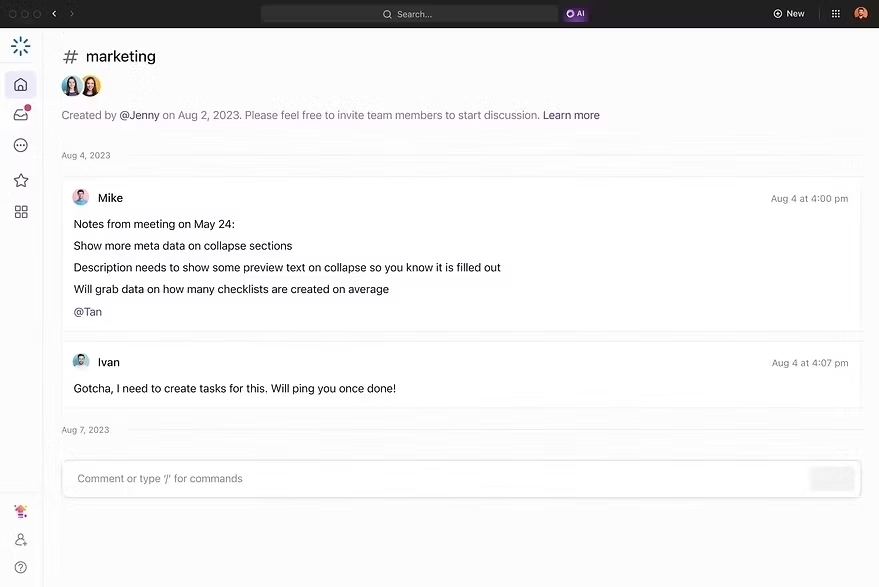
👉 Why it matters: No need for separate communication tools—everything stays connected to work.
How ClickUp Improves Project Outcomes
ClickUp improves results in practical ways:
1. Better Planning
AI helps create realistic timelines and avoids over-promising.
2. Faster Execution
Automation reduces delays and keeps work moving.
3. Clear Communication
Everyone stays updated without confusion.
4. Smarter Decisions
AI insights help managers take the right actions quickly.
If you want to learn more about ClickUp and AI-powered project management, you can connect with Yasir Ali Warraich on LinkedIn.
How to Choose the Best Online Project Software
Choosing the right software is important because it directly affects your team’s performance. A good tool should not only manage tasks but also improve the way your team works.
Key Factors Explained
Ease of Use
If a tool is too complex, your team will not use it properly.
AI Capabilities
The tool should support automation and smart insights.
Customization
Every team works differently. The tool should adapt to your needs.
Integration
It should connect easily with other tools you use.
Scalability
It should grow with your business.
👉 Explore a complete solution here:https://itsarkar.my.canva.site/corporate-profile-2025
Comparison with Other Tools
When comparing ClickUp with other tools like Asana, Trello, and Monday.com, the main difference is how much you can do in one place.
Some tools are simple and focus only on task tracking. Others are good for specific use cases like agile or CRM. But when teams grow, they need more than just one feature—they need a complete system.
ClickUp solves this by combining everything:
Task management
AI automation
CRM features
Reporting
Collaboration
This reduces the need to switch between tools and makes work faster and more organized.
Here's the full Comparison of ClickUp with other tools.
Unlocking the Future of Project Success
The future of project management is here, and it’s powered by AI. Embracing AI-driven project solutions means faster delivery, smarter decisions, and better results. Whether you’re a startup or a large enterprise, integrating AI can help you stay competitive and agile.
Don’t wait for the future to arrive. Take control now. Explore how AI can transform your projects and unlock new levels of success.
Remember, the key is to start with clear goals, choose the right tools, and keep improving. Your projects deserve the boost that AI can provide.
Conclusion
AI is changing how projects are managed. It helps teams work faster, reduce mistakes, and achieve better results. But the real value comes when AI is combined with the right platform.
ClickUp stands out because it brings everything together—tasks, communication, automation, and AI. It simplifies work and helps teams focus on what really matters: delivering results.
If you want to improve your project outcomes, using an AI-powered tool like ClickUp is a smart step forward.
Your business deserves the best. Let IT Sarkar show you the way_ book a free session and let’s explore together.


Comments