Choosing the Best Online Project Software

Let’s be honest—managing projects today is not easy. Deadlines are tight, teams are remote, and expectations are higher than ever. One missed task or unclear communication can delay everything. Many teams still rely on emails, spreadsheets, and scattered tools, which only creates confusion instead of clarity.
This is where online project management software changes everything. But not just any tool—AI-powered tools. These tools don’t just track work; they help you think smarter, plan better, and avoid problems before they happen.
Choosing the right software is no longer a simple decision. It directly affects your productivity, team performance, and business growth. In this article, we’ll explore what makes a project management tool effective, how AI improves it, and which platforms are worth considering—with a strong focus on why ClickUp stands out as the preferred choice.
Why Top Online Project Tools Matter More Than Ever
In today’s fast-paced digital world, managing projects efficiently is non-negotiable. Top online project tools help you organize tasks, track progress, and communicate seamlessly across teams. They reduce the chaos and bring clarity to complex projects.
Think about it: without a solid system, deadlines slip, communication breaks down, and productivity tanks. But with the right software, you get:
Centralized task management
Real-time collaboration
Automated workflows
Insightful reporting
These features aren’t just nice to have—they’re essential for staying competitive and agile.

Key Features to Look for in Top Online Project Tools
Not all project management software is created equal. When choosing your tool, focus on features that align with your business goals and team dynamics.

Here’s what to prioritize:
1. User-Friendly Interface
A clean, intuitive interface means less time training and more time doing. Your team should be able to jump in and start managing tasks without a steep learning curve.
2. Task and Deadline Management
Look for tools that let you create, assign, and track tasks easily. Features like due dates, reminders, and priority settings keep everyone accountable.
3. Collaboration Capabilities
Communication is key. Choose software that supports comments, file sharing, and real-time updates. Integration with email and chat apps is a bonus.
4. Customizable Workflows
Every business operates differently. The best tools let you tailor workflows, statuses, and templates to fit your unique processes.
5. Reporting and Analytics
Data drives decisions. Good project software provides insights into project progress, resource allocation, and bottlenecks.
6. Integration with Other Tools
Your project software should play well with others—whether it’s your CRM, calendar, or cloud storage.
7. Scalability and Security
As your business grows, your software should grow with you. Also, ensure it meets your security standards to protect sensitive data.
How to Evaluate and Compare Project Management Software
Choosing the right software isn’t just about features—it’s about fit. Here’s a step-by-step approach to make your decision easier:
Step 1: Define Your Needs
Start by listing your must-haves and nice-to-haves. Consider team size, project complexity, and budget.
Step 2: Research Options
Look for reviews, case studies, and demos. Pay attention to how other businesses in your industry use the software.
Step 3: Test Drive the Software
Most providers offer free trials. Use this time to test key features with your team. Does it feel intuitive? Does it solve your pain points?
Step 4: Check Customer Support
Reliable support can save you headaches. Test response times and available resources like tutorials and forums.
Step 5: Consider Long-Term Value
Don’t just look at upfront costs. Factor in scalability, updates, and potential ROI.
By following these steps, you’ll narrow down your options and find a tool that truly fits your workflow.

Real-World Examples of Top Online Project Tools in Action
Let’s look at how different businesses leverage project management software to supercharge their operations:
Startups use agile tools like Trello or Asana to keep their small teams aligned and flexible. Visual boards and simple task assignments help them move fast and pivot easily.
Mid-sized companies often prefer tools like Monday.com or Wrike for their robust customization and reporting features. These platforms help manage multiple projects and departments seamlessly.
Large enterprises rely on comprehensive solutions like Microsoft Project or Jira. These tools offer advanced resource management, integration with enterprise systems, and strong security protocols.
No matter your size, the right tool can streamline communication, reduce manual work, and improve project visibility.
Why I Recommend the Best Project Management Software Online
After testing and using various platforms, I can confidently say that the best project management software online offers a perfect blend of usability, flexibility, and power. It’s designed to help businesses like yours automate workflows, enhance collaboration, and make data-driven decisions.
Choosing this software means you’re not just buying a tool—you’re investing in a partner that grows with your business. It supports AI-driven insights, cloud-based access, and automation features that keep your team ahead of the curve.
Making Your Choice: What’s Next?
Now that you know what to look for and how to evaluate your options, it’s time to take action. Don’t settle for a tool that just “works.” Aim for one that transforms how you manage projects and drives real results.
Start with a clear list of your needs.
Explore demos and trials.
Involve your team in the decision.
Plan for training and onboarding.
Remember, the right project management software is an investment in your business’s future. It’s the foundation for smoother workflows, better communication, and faster delivery.
ClickUp: The AI-Powered Project Management Solution
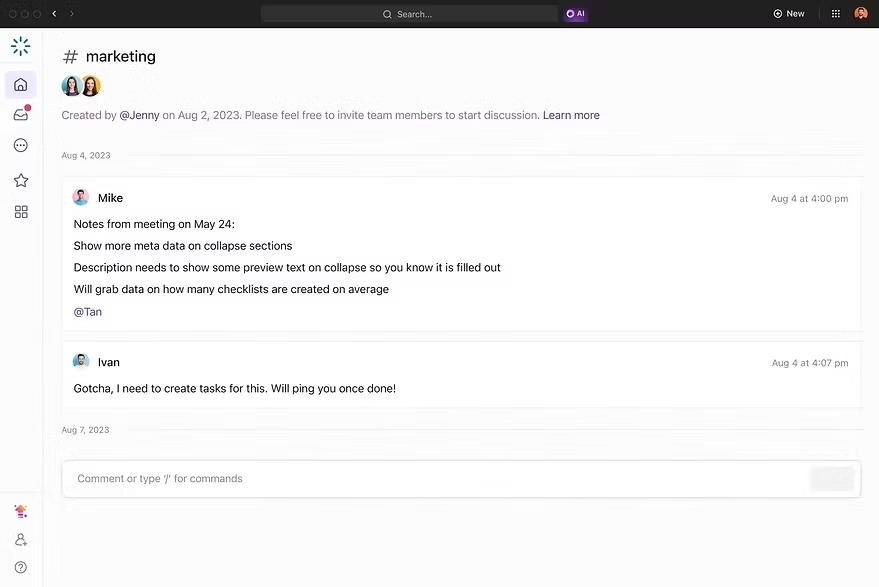
ClickUp is more than just a project management tool. It is an all-in-one platform that combines task management, communication, automation, and AI in a single workspace. It is designed for teams of all sizes—from startups to large enterprises.
What makes ClickUp stand out is its flexibility and AI integration. It doesn’t force you to change your workflow; instead, it adapts to your needs.
Core Features of ClickUp
1. Task and Project Management
Create tasks and subtasks
Assign responsibilities
Set deadlines and priorities

2. Custom Views
List view
Board view
Calendar view

3. AI Assistant
Generate content
Summarize tasks
Create reports
Suggest improvements

4. Automation
Auto-assign tasks
Send reminders
Update statuses

5. Collaboration Tools
Comments and mentions
Real-time updates
Shared documents
If you want to learn more about ClickUp and AI-powered project management, you can connect with Yasir Ali Warraich on LinkedIn.
Comparison: ClickUp vs Other Tools
When comparing ClickUp with other project management tools, one key difference becomes clear—ClickUp offers everything in one place.
Other tools may provide strong features in one area, such as task management or collaboration, but they often require additional tools for CRM, HR, or marketing. This creates complexity and increases costs.
ClickUp eliminates this problem by combining multiple solutions into a single platform. Its AI capabilities also go beyond basic automation. It helps teams think, plan, and execute better.
While other tools may work well for specific tasks, ClickUp stands out as a complete solution for modern teams.
Here's the full Comparison of ClickUp with other tools.
Conclusion
Choosing the best online project management software is one of the most important decisions for any business. The right tool can improve productivity, reduce stress, and help teams deliver better results.
While there are many options available, ClickUp stands out because it combines everything in one place—task management, collaboration, automation, and AI.
It is not just a tool; it is a complete system that supports teams at every stage of their work.
If your goal is to work smarter, save time, and grow your business, ClickUp is the solution worth choosing.
Got questions or ideas? I’d love to hear them – book a free session and let’s explore together.



Comments