Inconsistent Onboarding? Standardized Workflows Create a Better First Impression.

Imagine joining a new company on Monday morning.
You are excited. You have accepted the offer, completed the paperwork, and are ready to start. But when you arrive, nobody seems completely sure what happens next. One person tells you to contact HR. Another asks you to wait for your manager. Your laptop is not ready. You do not know where to find company documents. You are added to some communication channels but not others.
By the end of the first week, you may already be wondering whether you made the right decision.
This is the hidden cost of inconsistent onboarding.
Onboarding is often treated as a simple HR process, but it is actually the employee's first real experience with an organization. It shows new employees how organized the company is, how teams communicate, how managers work, and how seriously the organization takes its people.
A strong onboarding process does not happen because one HR employee remembers every step. It happens because the organization has a standardized workflow that makes the right process easy to follow every time.
And this is where productivity tools and AI can make a major difference.
Instead of relying on memory, scattered documents, emails, and manual reminders, companies can create repeatable onboarding workflows where tasks, responsibilities, documents, deadlines, and communication are connected.
Among the available productivity and project management platforms, ClickUp is particularly useful because onboarding can be managed as an organized workflow rather than a collection of disconnected activities.
The goal is simple:
Every new employee should receive the same level of clarity, support, and organization—while still getting a personalized experience.
What Is Employee Onboarding?
Employee onboarding is the process of helping a new employee understand their role, team, company culture, and daily responsibilities. It usually starts before the employee’s first day and continues through their first weeks or months. A good onboarding process gives employees the information, tools, training, and support they need to start their work with confidence. Instead of leaving new employees to figure everything out themselves, a clear onboarding workflow guides them step by step.
Effective onboarding is more than completing paperwork or setting up accounts. It is the employee’s first real experience of how an organization works. When the process is organized and consistent, employees know what to expect, who to contact, and what they need to complete. Standardized workflows can make this experience smoother while also reducing repetitive work for HR and managers. With AI-powered tools, organizations can also organize information, summarize meetings, create useful resources, and support employees throughout the onboarding process.
Why Inconsistent Onboarding Creates Problems
An inconsistent onboarding process can look harmless from the outside.
Maybe one employee receives a welcome email while another does not. Maybe one person gets a structured training plan while another simply receives a list of documents. Maybe one manager schedules weekly check-ins while another does not.
But these small differences can create much larger problems.
1. New Employees Start With Confusion
A new employee already has a lot to understand.
They are learning names, systems, responsibilities, processes, and expectations.
If the onboarding process is unclear, they spend valuable time asking basic questions.
Instead of thinking:
"How can I contribute?"
they may be thinking:
"Who should I ask?"
That difference matters.
2. Managers Forget Important Steps
Managers are busy managing their existing responsibilities.
They may genuinely want to provide a good onboarding experience, but onboarding can easily become an afterthought.
Without a workflow, managers may forget to:
Schedule introductions
Share important documents
Assign training
Set goals
Schedule check-ins
Explain team processes
A standardized workflow reduces dependence on memory.
3. HR Teams Repeat the Same Work
HR teams often send similar emails, create similar checklists, collect similar information, and answer similar questions for every new employee.
When this work is manual, it consumes time that could be spent on more strategic HR activities.
Standardization creates a repeatable process.
AI can take this further by helping HR teams create content, summarize information, prepare communication, and reduce repetitive administrative work.
What Is a Standardized Onboarding Workflow?
A standardized onboarding workflow is a clear and repeatable process that guides every new employee through the same essential onboarding steps. Instead of leaving managers to decide what to do each time, the workflow defines important activities such as completing paperwork, setting up accounts, introducing the team, sharing company policies, assigning initial tasks, and scheduling check-ins. This gives new employees a clear understanding of what they need to do and what they can expect during their first days and weeks.
Standardization does not mean every employee receives exactly the same experience. The core process remains consistent, while tasks and information can be adjusted according to the employee's role, department, and responsibilities. With project management and AI tools, teams can organize onboarding tasks, automate repetitive steps, send reminders, and keep important information in one place. This makes onboarding easier to manage while giving new employees a more organized, professional, and positive first impression.
The Essential Elements of a Strong Onboarding Workflow
A strong onboarding workflow gives every new employee a clear path from their first day to becoming comfortable and productive in their role. Instead of giving new employees random instructions, documents, and meetings, the organization follows a structured process. This creates consistency while still allowing room for personal support.
Here are the key elements:

1. Pre-boarding Preparation
Onboarding should start before the employee's first day. Prepare their accounts, workspace, equipment, required documents, and basic information in advance. This helps the employee feel expected and welcomed rather than spending their first day waiting for access.
2. A Clear First-Day Plan
The first day should have a simple schedule. It can include an introduction to the team, company overview, role expectations, workplace policies, and an introduction to the tools they will use. A clear plan reduces confusion and gives the employee confidence.
3. Role-Specific Training
Every employee needs to understand what their actual responsibilities are. Provide information about their role, daily tasks, reporting structure, key processes, and performance expectations. Training should focus on what the employee needs to do their job rather than overwhelming them with unnecessary information.
4. Centralized Information
Important onboarding information should be available in one organized place. This can include company policies, training materials, FAQs, process documents, contact information, and role guidelines. A centralized knowledge base means employees do not have to repeatedly ask where to find basic information.
5. Assigned Tasks and Deadlines
Onboarding becomes easier to manage when responsibilities are converted into clear tasks. For example, completing paperwork, attending training, meeting team members, reviewing documents, and setting up accounts can each have an owner and deadline.
6. Regular Check-ins
Onboarding should not be a one-day activity. Managers should schedule regular check-ins during the first few weeks to ask what is going well, what is unclear, and where the employee needs support. These conversations also help managers identify problems before they become bigger issues.
7. Automation for Repetitive Work
Many onboarding activities are repetitive, such as sending reminders, assigning standard tasks, sharing documents, and tracking completion. Workflow automation can handle these routine steps so HR and managers can spend more time supporting the new employee.
8. AI Support
AI can make onboarding more efficient by helping organize information, summarize training or meeting notes, create draft instructions, answer common questions from available company information, and identify missing steps in a workflow. The goal is not to replace human interaction but to reduce unnecessary administrative work.
9. Progress Tracking
Managers and HR teams should be able to see how onboarding is progressing. A simple dashboard or task view can show completed activities, pending tasks, upcoming training, and areas that need attention.
10. Feedback and Improvement
A strong onboarding workflow should improve over time. Ask new employees about their experience after their first week or month. Their feedback can reveal confusing instructions, missing resources, unnecessary steps, or delays in the process.
The key idea is simple: onboarding should give employees the right information, at the right time, through a clear and consistent process. When workflows are standardized and supported by automation and AI, organizations can create a smoother first impression without making the experience feel robotic.
ClickUp for Standardized Employee Onboarding
A good onboarding process should not depend on one HR manager remembering every step. It should follow a clear system that gives every new employee the same strong start. This is where ClickUp can help.
ClickUp is an all-in-one productivity and work management platform that brings tasks, Docs, communication, dashboards, forms, automations, and AI into one workspace. Instead of keeping onboarding information in different files, emails, chats, and spreadsheets, a company can organize the complete onboarding workflow in one place.
For onboarding, the real value is not simply having more features. The value is creating a repeatable onboarding system. HR can create a standard process once and use it whenever a new employee joins. Managers can see what needs to be completed, new employees can clearly understand their responsibilities, and the company can track progress without constantly asking for updates.
ClickUp Features That Support Onboarding
1. Tasks
Onboarding involves many small activities, from submitting documents to completing training. ClickUp Tasks allow HR to create and assign these activities with deadlines.
This gives every new employee a clear checklist and makes it easier for managers to track progress.

2. Templates
A standard onboarding template can include all the important steps that every new employee should complete.
HR can reuse the same workflow for every new hire while still making small changes based on the employee's role.
3. ClickUp Docs
ClickUp Docs can be used to store important onboarding information such as company policies, procedures, training material, team guidelines, and FAQs.
New employees can have one central place to find the information they need.
4. Automations
Many onboarding activities are repetitive. ClickUp Automations can help move routine tasks forward, send notifications, and assign work based on workflow conditions.
This reduces unnecessary manual follow-up for HR and managers.

5. Forms
Forms can help HR collect information from new employees before or during onboarding.
For example, HR can collect basic employee details, equipment requirements, or other information and connect that information to the onboarding workflow.
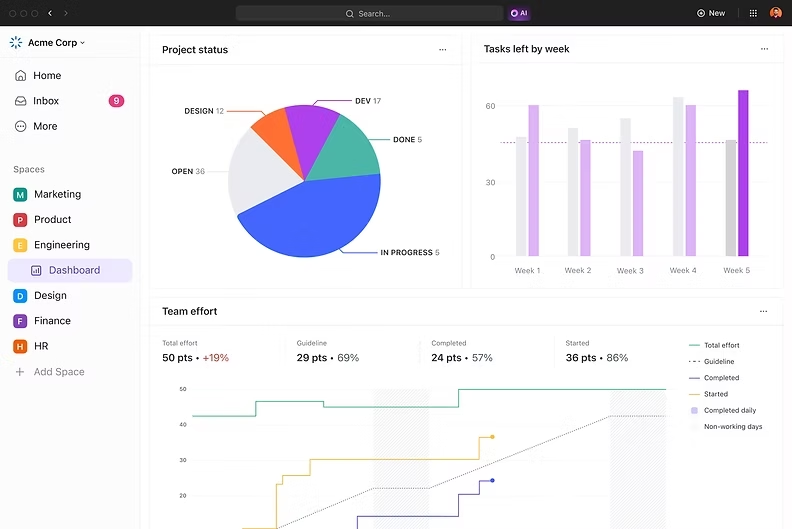
6. Dashboards
ClickUp Dashboards give HR and managers a quick view of onboarding progress.
They can see which activities are completed, which are still pending, and where attention may be needed.
7. AI
AI can make the onboarding process more efficient by helping teams summarize information, create or organize tasks, and find relevant information within the workspace.
For new employees, AI can also make large amounts of onboarding information easier to understand and access.

Why ClickUp Makes Sense for Onboarding
The biggest advantage of using ClickUp for onboarding is connection.
The employee's tasks can connect with the documents they need. Documents can connect with the work they support. Conversations can stay close to tasks. Automations can move repetitive work forward. Dashboards can show progress. AI can help employees and managers find and process information faster.
Instead of treating onboarding as a collection of emails, documents, and reminders, a company can turn it into a structured workflow.
And that is exactly what standardized onboarding should do: give every new employee a clear process while giving HR and managers better visibility and control.
If you want to learn more about ClickUp and Productivity Management, you can connect with ME on LinkedIn.
How AI Can Improve Onboarding Workflows
AI changes the conversation from simply managing tasks to managing work more intelligently.
Instead of using AI only for content creation, organizations can use it to support the entire onboarding process.
AI can help with:
Creating onboarding checklists
Summarizing documents
Drafting welcome messages
Creating training outlines
Turning meeting notes into action items
Summarizing employee feedback
Preparing progress updates
Identifying missing information
Organizing large amounts of onboarding content
The important point is that AI should support people, not replace the human side of onboarding.
A new employee still needs a real conversation with their manager.
AI simply helps the organization make sure that the conversation, documentation, and follow-up happen at the right time.
The Manager's Role in Standardized Onboarding
Technology cannot replace a good manager.
A workflow can remind a manager to schedule a meeting, but it cannot create trust by itself.
Managers should still:
Welcome new employees personally
Explain expectations
Introduce team members
Provide feedback
Answer questions
Set early goals
Check progress
Encourage open communication
The workflow should make these activities easier to remember and manage.
It should not make them feel automated.
Creating a 30-60-90 Day Onboarding Plan
A 30-60-90 day onboarding plan is a structured plan that helps a new employee understand their role, settle into the organization, and gradually take responsibility.
Instead of giving a new employee everything on the first day, the onboarding process is divided into three stages: 30 days, 60 days, and 90 days.
First 30 Days — Learn & Understand
The first month is mainly about orientation and learning.
The employee gets familiar with:
The company and its culture
Their team and manager
Their job responsibilities
Company policies and processes
The tools and systems they will use
Current projects and priorities
The goal is not to expect major results immediately. The employee should understand how the organization works and what is expected from them.
Example:
A new marketing executive may spend the first 30 days learning the brand guidelines, understanding the target audience, reviewing previous campaigns, and getting familiar with the company's marketing workflow.
Days 31–60 — Apply & Contribute
The second stage is about putting knowledge into practice.
The employee starts handling real responsibilities with less supervision. They may:
Take ownership of smaller tasks
Work on team projects
Attend important meetings
Start making decisions within their role
Receive feedback from their manager
Identify areas where they can improve
The goal is to move the employee from learning the job to actively contributing to the team.
Days 61–90 — Own & Improve
By the third month, the employee should have a much clearer understanding of their role.
Now the focus shifts toward independence, ownership, and measurable results.
The employee can:
Take ownership of larger projects
Work more independently
Set performance goals
Suggest improvements
Track their progress
Discuss long-term responsibilities with their manager
At this stage, the manager can also review the employee's first 90 days and discuss what is going well and what needs more support.
Why This Works Well for Onboarding
A 30-60-90 day plan makes onboarding clear and consistent. Every new employee knows what they should focus on instead of trying to figure everything out themselves.
It also gives managers a simple framework for providing support and feedback.
For a project management system such as ClickUp, the entire plan can be organized into tasks, deadlines, checklists, documents, and progress tracking. AI can also assist with organizing onboarding information, summarizing feedback, and helping managers keep track of recurring onboarding activities.
In simple terms:
30 days = Learn
60 days = Contribute
90 days = Take ownership
This is why a 30-60-90 day plan is useful in a standardized onboarding workflow: it gives every new employee a clear path from their first day to becoming a productive member of the team.
Common Onboarding Mistakes to Avoid
Even organizations with good intentions can create poor onboarding experiences.
Mistake 1: Giving Too Much Information at Once
New employees cannot absorb everything in a single day.
Use a structured schedule.
Give people information when they need it.
Mistake 2: Relying Only on Documents
Documents are useful, but people also need conversations.
Mistake 3: No Clear Owner
Every onboarding activity should have someone responsible.
Mistake 4: No Follow-Up
A welcome meeting is not enough.
Managers should continue checking in.
Mistake 5: Using the Same Process for Everyone
Standardization is useful, but employees still need role-specific onboarding.
Mistake 6: Ignoring Employee Feedback
The onboarding process should improve over time.
Ask employees what worked and what did not.
Building an Onboarding Workflow Step by Step
A good onboarding workflow should make the first days of a new employee clear, organized, and easy to manage. Instead of sending information through different emails, messages, and documents, companies can bring everything into one structured process.
This gives the new employee a clear path and helps the HR or management team know what needs to happen next.

Step 1: Start Before the Employee’s First Day
Onboarding should begin before the employee joins the team. Create tasks for collecting required documents, preparing the workspace, setting up accounts, arranging equipment, and sharing basic company information. AI can also help create checklists or organize standard onboarding information so that HR does not have to start from zero for every new employee.
Step 2: Create a Standard Onboarding Checklist
Next, create one master checklist that covers the most important onboarding activities. This can include HR documentation, company introduction, team meetings, training sessions, system access, role-specific tasks, and manager check-ins. The checklist becomes the standard process that can be reused for every new employee.
Step 3: Assign Every Task to Someone
An onboarding task should never simply say “complete this.” Someone should be responsible for it. For example, HR can handle documentation, IT can manage system access, the manager can introduce the employee to the team, and the employee can complete required training. Clear ownership prevents important tasks from being forgotten.
Step 4: Add Deadlines and Priorities
Not every onboarding activity needs to happen on the same day. Some tasks need to be completed before the employee starts, while others can happen during the first week or first month. Set deadlines and priorities so everyone knows what needs immediate attention and what can come later.
Step 5: Create Role-Specific Workflows
A marketing employee does not need exactly the same onboarding experience as a developer, salesperson, or HR professional. Keep the basic onboarding process standardized, but add role-specific tasks where necessary. This creates consistency without making the process feel generic.
Step 6: Put Important Information in One Place
New employees often have many questions during their first few weeks. Create a central knowledge area containing company policies, team information, processes, training material, FAQs, and important links. AI can help employees find or summarize information faster, while the main source of information remains organized and easy to access.
Step 7: Automate Repetitive Steps
Once the workflow is working, identify tasks that happen repeatedly. Reminders, task assignments, follow-ups, and recurring onboarding activities can often be automated. This reduces the amount of manual work HR and managers have to do and makes the process more consistent.
Step 8: Add Manager Check-Ins
Onboarding is not only about completing paperwork. New employees also need communication with their manager. Schedule check-ins for the first day, first week, and later milestones. These conversations give employees a chance to ask questions, discuss challenges, and understand whether they are progressing in the right direction.
Step 9: Track Progress
A standardized workflow should make progress visible. Managers and HR should be able to see which tasks are completed, which are still pending, and where someone may need support. A project management platform such as ClickUp can bring these tasks, deadlines, documents, communication, and progress tracking into one workspace.
Step 10: Review and Improve the Workflow
The onboarding process should not remain unchanged forever. After each onboarding cycle, ask what worked and what caused confusion. AI can assist with organizing feedback and identifying repeated issues, while HR and managers can decide what changes should be made to the workflow.
How This Looks in Practice
For example, a company hiring a new marketing executive could create an onboarding workflow like this:
Before Day 1 → Documentation → Equipment & Account Setup → Welcome Information
Day 1 → Company Introduction → Team Introduction → Manager Meeting → Role Overview
Week 1 → Training → Tools & Processes → First Small Task → Feedback Session
First 30 Days → Role-Specific Training → Performance Check-In → Goals → Development Plan
The important point is that the workflow is standardized, but the employee experience can still be personal. The company does not have to treat every employee exactly the same. It simply creates a consistent foundation so that no important step is missed.
ClickUp vs Other Productivity and Project Management Tools
ClickUp stands out by bringing project management, task management, documents, goals, dashboards, collaboration, automation, and AI into one workspace. While tools such as Asana, Monday.com, Notion, and Jira each have their own strengths, ClickUp offers a broader set of features for teams that want to manage different types of work in one place. Its flexible views, customizable workflows, automation, and AI support can help reduce app switching and keep projects, communication, and information connected.
Here's the full Comparison of ClickUp with other tools.
The Future of Onboarding Is AI-Assisted, Not AI-Replaced
AI will continue to change how organizations manage employees.
We will see more intelligent workflows, smarter recommendations, automated summaries, and better use of organizational data.
But the strongest onboarding systems will not remove people from the process.
They will remove unnecessary work from the people responsible for onboarding.
That is an important difference.
The future is not:
AI welcomes the employee instead of the manager.
The future is:
AI helps the manager create a better welcome with less administrative work.
That is a much more useful way to think about AI in productivity.
Final Thoughts: Make Your First Impression Count
A new employee should not have to figure out your organization on their own.
They should not wonder where to find information.
They should not chase people for access.
They should not receive a different experience simply because their manager or HR representative follows a different process.
A standardized onboarding workflow creates consistency.
Automation creates efficiency.
AI creates additional support.
And human interaction creates connection.
When these four elements work together, onboarding becomes more than a checklist. It becomes a structured experience that helps employees feel prepared, welcomed, and ready to contribute.
ClickUp can play an important role in bringing this system together. Its flexible workspace, workflow capabilities, documentation, task management, automation, and AI features make it a strong option for organizations that want to move away from scattered onboarding processes.
Conclusion
Inconsistent onboarding is rarely caused by a lack of effort. Most organizations have good people trying to do the right thing. The problem is that the process often depends too much on memory, manual coordination, and scattered information.
Standardized workflows solve that problem.
They create a clear structure that everyone can follow while still leaving room for personal interaction. Add automation, and repetitive coordination becomes easier. Add AI, and teams can summarize information, prepare content, organize knowledge, and gain useful insights faster.
The result is a better experience for everyone involved.
HR spends less time chasing tasks.
Managers have better visibility.
New employees receive clearer guidance.
And organizations create a more consistent first impression.
Your onboarding process is the first system a new employee experiences. Make sure it works as well as the people behind it.
Book a free consultation session with me and let's design an onboarding system that works for your team, using ClickUp, automation, and AI to create a process that runs smoothly every single time.


Comments