Scattered Invoices? Centralized Billing Keeps Cash Flow Predictable.

It is the last week of the month. Your team has done great work, clients are happy, and projects are moving. Then you sit down to check how much money is coming in, and the trouble starts. One invoice is in an email draft. Another is saved on someone's laptop. A third was sent, but nobody remembers if the client paid. You open a spreadsheet, and it was last updated three weeks ago.
I have been in that seat. And I can tell you that the stress does not come from a lack of work or a lack of clients. It comes from not knowing. Not knowing what has been billed, what is overdue, and what money will actually land in the bank next week.
When invoices are scattered, cash flow feels like guesswork. You cannot plan hiring, buy tools, or pay vendors with confidence because the numbers keep moving under your feet.
The good news is that this problem has a simple fix: bring all your billing into one central place. When you combine a connected workspace with a little help from AI, your invoices stop hiding and your cash flow becomes something you can actually predict.
Why Invoices Get Scattered in the First Place
Before we jump into solutions, let us understand how teams end up in this mess. Most of the time, it happens slowly and quietly.
Billing Lives in Too Many Places
An invoice is created in one file, sent from one inbox, tracked in a spreadsheet, and the payment shows up in a bank statement. Each piece is real, but none of them talk to each other. To get the full picture, someone has to stitch it together by hand.
One Person Holds All the Knowledge
In many small and growing teams, one person "handles billing." They know which client pays late, which invoice is disputed, and which project still needs to be billed. When that person is sick, on leave, or simply busy, billing stops.
Work Is Finished but Not Billed
This one hurts the most. A project is completed, the client is happy, and everyone moves on to the next thing. Nobody creates the invoice. Weeks later, someone notices, and now the money is late because of your own process, not the client.
Follow-Ups Depend on Memory
"I will remind the client on Friday" is a nice thought, but it is not a system. Friday gets busy. The reminder never goes out. A 30-day invoice quietly becomes a 60-day invoice.
No Clear View of What Is Coming
Without one place to see all invoices and their status, you cannot answer simple questions like "How much do we expect to collect this month?" And if you cannot answer that, you cannot plan.
What Is Centralized Billing?
Centralized billing means keeping every invoice, payment status, client detail, and billing conversation in one shared and organized place.
Instead of searching through emails, folders, and old spreadsheets, your team opens one workspace and sees everything: which invoices are drafted, which are sent, which are paid, and which are overdue.
It does not mean you need to throw away your accounting software. It means the billing process (who bills what, when, and what happens next) lives in one place that the whole team can see and trust.
Why One Place Changes Everything
When billing lives in one place, three things happen. First, nothing gets forgotten, because every piece of billable work is visible. Second, everyone works from the same numbers. Third, you can look ahead and see the money coming in, not just look back at what already happened.
How Centralized Billing Keeps Cash Flow Predictable
Predictable cash flow is not about luck. It is about visibility and consistency. Here is how a central billing system makes that happen.
You See Every Invoice at a Glance
With one view of all invoices, you know exactly what is in draft, what is sent, and what is paid. No more opening five files to answer one question.
Billing Happens on Time, Every Time
When finishing a project automatically creates a billing step, invoices go out when they should. Faster invoicing means faster payments.
Overdue Payments Are Caught Early
A central system shows overdue invoices clearly. Instead of finding out two months later, you notice on day one and follow up while the client still remembers the work.
Forecasting Becomes Possible
When every invoice has an amount and a due date in one place, you can add them up and see what is expected this week, this month, and this quarter. That is the heart of predictable cash flow.
Everyone Knows Their Role
Each invoice has an owner. The project manager confirms the work is done, finance creates and sends the invoice, and someone is responsible for follow-up. Nobody wonders, "Was I supposed to do that?"
A Clean Record for Audits and Disputes
When a client says, "We never got that invoice," you can show exactly when it was sent, who sent it, and every conversation around it. This saves time, protects relationships, and keeps your records clean.
The Building Blocks of a Centralized Billing System
You do not need a complicated setup to get started. A strong billing system is built from a few simple tools that work together. Let me walk you through each one in detail.

A Central Invoice Tracker
A central invoice tracker is one list where every invoice lives from the moment it is created until it is fully paid.
What It Holds
Each invoice record includes the client name, invoice number, amount, issue date, due date, payment status, and the project it belongs to. Think of it as the single source of truth for everything you bill.
Why It Helps
When someone asks, "Has the March invoice for our biggest client been paid?", the answer takes seconds. There is no digging and no guessing.
How to Start
Create one list for invoices. Add each open invoice as its own item. Do not worry about old history at first. Start with what is open today and build from there.
Clear Billing Statuses
Statuses show where each invoice is in its journey. They turn a messy pile into a clear pipeline.
Simple Statuses That Work
Use easy labels like Ready to Bill, Draft, Sent, Partially Paid, Overdue, and Paid. Anyone on the team can understand them without training.
Why It Helps
Statuses let you filter and group invoices instantly. Want to see everything overdue? One click. Want to see what is ready to bill but not sent? One click.
Keep the Steps Few
Too many statuses create confusion. Five or six is usually enough for most teams.
Billing Fields and Client Details
Fields are the small pieces of information attached to each invoice that make sorting, filtering, and reporting possible.
What to Track
Useful fields include Client, Invoice Amount, Currency, Due Date, Payment Method, Billing Contact, and Project. If you bill by hours, add a field for billable hours too.
Why It Helps
With good fields, you can answer big questions fast: "How much does this client owe us in total?" or "What is due in the next 14 days?" The data is already there, ready to use.
Keep It Consistent
Use the same fields for every invoice. Consistency is what makes reports trustworthy.
Connected Time Tracking and Project Work
Billing should not live on an island. It should be connected to the actual work your team does.
Link Invoices to Projects
When an invoice is linked to the project or tasks it covers, anyone can see what work is being billed. This reduces questions from clients and from your own team.
Track Billable Time
If you charge by the hour, tracking time directly on tasks means your invoice is based on real numbers, not memory. No more under-billing because someone forgot to log their hours.
Why It Helps
When work and billing are connected, finished work turns into invoices faster and more accurately.
Automated Reminders and Workflows
Automation handles the small, repeated steps that people often forget.
What Automation Can Do
It can create a billing task when a project is marked complete. It can remind the owner when an invoice due date is near. It can move an invoice to Overdue when the due date passes and notify the right person.
Why It Helps
Automation removes the "I forgot" problem. Your follow-ups happen on time, even during your busiest weeks.
Start Small
Pick two or three automations that save the most time, like overdue alerts and "project done, ready to bill" triggers. Add more once your team feels the benefit.
Cash Flow Dashboards
A dashboard is a visual screen that shows the health of your billing in one view.
What You Can See
You can see total outstanding amounts, overdue invoices, expected payments this month, and which clients pay late. Charts make trends easy to spot.
Why It Helps
Leaders do not need to ask for a report. They open the dashboard and understand the cash position in seconds. This makes planning for salaries, purchases, and growth much easier.
Shared Billing Documents
Documents keep your billing rules and processes written down in one place.
What to Document
Write down your payment terms, invoice templates, late-payment policy, client billing preferences, and the step-by-step billing process.
Why It Helps
When the process is written clearly, billing does not depend on one person. New team members can follow the same steps from day one.
The Role of AI in Centralized Billing
This is where things get really exciting. AI is changing how teams manage work, and billing is one of the best places to use it. AI does not replace your finance team. It helps them see more, do less manual work, and act faster.
AI Summarizes Your Billing Status
Instead of scrolling through dozens of invoices, you can ask AI, "What is overdue right now and how much is it?" and get a clear answer in seconds.
AI Spots Payment Patterns
AI can notice which clients regularly pay late, which months are slow, and where cash might get tight. This helps you plan ahead instead of reacting.
AI Drafts Payment Reminders
Writing a polite but firm follow-up email takes time. AI can draft one in seconds. You review the tone, make small changes, and send it.
AI Finds Unbilled Work
AI can look through completed projects and tasks and point out work that has not been invoiced yet. This alone can recover money you did not know you were missing.
AI Creates Weekly Cash Flow Updates
AI can prepare a short weekly summary: invoices sent, payments received, overdue amounts, and expected income for the coming weeks. Leaders stay informed without hours of manual reporting.
AI Answers Questions Instantly
Need to know when a client last paid, or which invoices are linked to a certain project? Just ask. AI searches your workspace and gives you the answer with context.
A quick reminder: AI is a helper, not the decision-maker. Always review important numbers, payment terms, and client communication before acting on them. Money matters deserve a human check.
How ClickUp Brings Billing Into One Place
ClickUp is the platform I personally recommend for teams that want to centralize their billing process. It brings tasks, fields, time tracking, automation, dashboards, documents, and AI together in one connected workspace.
The biggest advantage is that billing is not separated from the work. An invoice in ClickUp can be linked to the project, the client, the hours tracked, the conversation, and the next step. You do not need to jump between apps to understand where your money stands.
ClickUp is also flexible. A freelancer can start with a simple invoice list, while a growing agency can build a full billing pipeline with custom statuses, reports, and approval steps. You start small and grow at your own pace.
5 ClickUp Features That Keep Cash Flow Predictable
1. ClickUp Tasks and Custom Fields
In ClickUp, each invoice can be a task with its own owner, due date, and status. This turns billing into clear, trackable work instead of a pile of files.
Custom Fields let you add the details that matter, like Client, Invoice Number, Amount, Currency, Due Date, and Payment Status. You can then filter, sort, and group invoices any way you like. Want to see every unpaid invoice for one client? It takes seconds.

2. ClickUp Time Tracking
ClickUp Time Tracking lets your team log hours directly on the tasks they work on. You can mark time as billable and see exactly how much work went into each project.
When it is time to bill, the numbers are already there. No more guessing, no more forgotten hours, and no more under-billing.
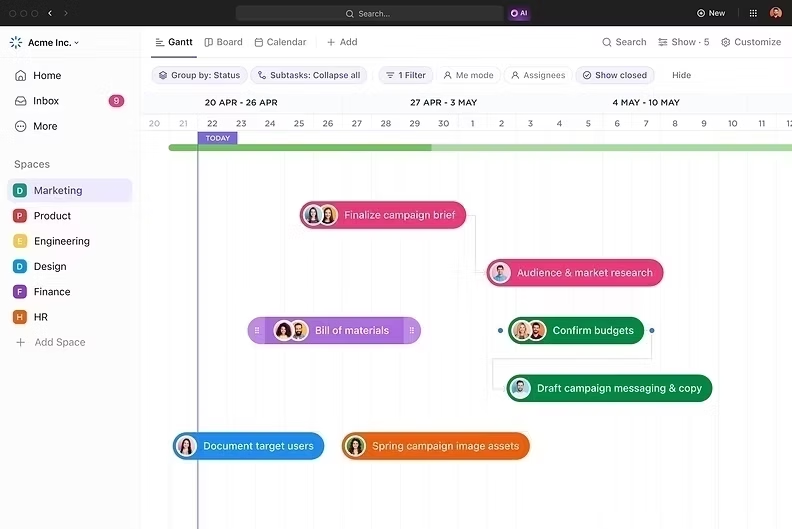
3. ClickUp Automations
ClickUp Automations do the repeated work for you. When a project moves to Complete, ClickUp can create a "Ready to Bill" task. When an invoice due date passes, it can change the status to Overdue and notify the right person. When a payment is marked received, it can close the loop automatically.
Your billing process keeps moving without anyone constantly checking and chasing.

4. ClickUp Dashboards
ClickUp Dashboards give you a live view of your billing health. You can add cards that show total outstanding amounts, overdue invoices, expected payments by month, and invoices by client.
Instead of building a report every Friday, you open the dashboard and see your cash position instantly. This is what turns cash flow from a guess into a plan.

5. ClickUp Brain
ClickUp Brain is the AI built right into your workspace, and this is where centralized billing becomes truly powerful.
You can ask ClickUp Brain to list all overdue invoices, summarize what each client owes, draft a payment reminder, find completed work that has not been billed, or create a weekly cash flow update for your leadership team. Because it works inside your workspace, it understands your tasks, fields, docs, and conversations.
Instead of digging through records, you get the answers in seconds. Your team still makes the final call, but the preparation becomes much faster.

If you want to learn more about ClickUp and Billing setup, you can connect with ME on LinkedIn.
A Simple ClickUp Billing Setup to Get Started
Here is an easy way to begin. Create a Folder called Billing. Inside it, create one List for Invoices and one List for Clients.
Add Custom Fields for client, invoice number, amount, currency, and due date. Use statuses such as Ready to Bill, Sent, Overdue, and Paid.
Write a ClickUp Doc with your payment terms and billing steps. Turn on Time Tracking for billable projects. Set up two or three Automations, like overdue alerts and "project complete, ready to bill." Build a simple Dashboard showing outstanding and overdue amounts. Then, every Monday, ask ClickUp Brain for a quick cash flow summary.
That is it. You do not need a perfect system on day one. You need a system your team will actually use.
Comparison With Other Tools
There are other good tools that help with billing. QuickBooks and Xero are strong accounting platforms for creating invoices, recording payments, and handling taxes, but they are built mainly for accountants, so project teams often stay outside the billing process. FreshBooks is simple and friendly for freelancers and small businesses, though it is less suited for managing larger team workflows around the work being billed. Zoho Invoice offers useful templates and payment reminders, but teams usually still need separate tools for project tracking, collaboration, and deeper AI support.
All of these can be useful depending on your needs, and many teams even connect them with their project workspace. But ClickUp is my preferred choice because it brings invoices, project work, time tracking, Automations, Dashboards, Docs, and ClickUp Brain into one connected workspace, so billing is never disconnected from the work that earns the money.
Here is the full Comparison of ClickUp with other tools.
Conclusion
Scattered invoices are rarely caused by bad clients or lazy teams. They are caused by billing that lives in too many places, depends on one person, and relies on memory for follow-ups.
When you bring billing into one central place, everything changes. Every invoice has a home, a status, and an owner. Work turns into invoices faster. Overdue payments are spotted early. Dashboards show you what is coming in. And AI helps you summarize, remind, and forecast in a fraction of the time.
ClickUp brings all of this together in one workspace. With Tasks and Custom Fields, Time Tracking, Automations, Dashboards, and ClickUp Brain, you can build a billing system that makes cash flow calm, clear, and predictable.
Do not let one forgotten invoice shake your whole month. Give every invoice a home, a clear owner, and a visible next step. That is how healthy businesses grow with confidence.
Ready to stop chasing invoices and start predicting your cash flow? Start with one central workspace, one clear billing process, and AI support where it saves the most time.
Book a session with me and let's build a practical ClickUp billing system for your team: Book a session.


Comments