Inconsistent Learning Experience? Standardized Training Workflows Solve It.

Last year, two young graduates joined one of my client's companies on the same Monday. Same role. Same department. Same salary. Both were bright and eager to learn.
Three months later, the manager came to me confused.
"Yasir, I don't understand. Ahmed is already handling clients on his own. Hina still isn't confident with our basic process. They joined on the same day. What went wrong?"
So I spoke to both of them.
Ahmed said, "My trainer was amazing. She showed me everything step by step, gave me checklists, and I could ask her anything."
Hina said, "My trainer was really busy. He sent me some old files and said, 'Read these, and ask me if you get stuck.' Half the files were outdated. I didn't want to keep bothering him."
Same company. Same role. Two completely different learning experiences. And the difference had nothing to do with talent. It was pure luck: who you got as a trainer and how busy they were that month.
That is when it hit me. When training depends on people instead of process, results depend on luck. And luck is not a strategy.
If your new hires learn different things from different people, if your training files are outdated, or if every department trains in its own way, you are not alone. This is one of the most common problems I see in growing teams.
In this article, I will explain why learning experiences become inconsistent, what a standardized training workflow is, how it creates fair and effective learning for everyone, where AI makes training smarter, and which tools can help. I will also share why I recommend ClickUp to the teams I coach at IT SARKAR.
What Is an Inconsistent Learning Experience?
Let me keep it simple. An inconsistent learning experience happens when people in the same role learn different things, in different ways, at different speeds, with different results.
It usually looks like this:
One trainee gets a full walkthrough, another gets a folder of old files
One department has clear training steps, another has none
Some people learn the "right" way, others learn shortcuts and bad habits
Nobody can say for sure who has completed which training
New hires feel confident in one team and lost in another
Think of it like a restaurant chain where every branch makes the same dish differently. One branch is perfect, another is too salty, and a third forgets an ingredient. Customers lose trust. In a company, the "customers" are your clients, and the "dish" is the quality of your work.
Why Learning Experiences Become Inconsistent
Most companies don't plan to have messy training. It just happens as they grow. Here is what usually goes wrong.
Training Lives in People's Heads
Your best trainers know everything, but very little is written down. When they are busy, on leave, or leave the company, their knowledge goes with them.
Every Trainer Teaches Differently
One trainer is detailed and patient. Another is fast and assumes a lot. Without a shared structure, each trainee gets a different version of the job.
Training Material Is Outdated or Scattered
The process document is from three years ago. The video is in someone's personal drive. The checklist exists only as a printed sheet on one desk. Trainees don't know what is current or where to find it.
Nobody Tracks Progress
Without tracking, nobody knows who has finished which module, who is stuck, or who skipped important steps. Problems only show up when a mistake reaches a client.
There Is No Feedback Loop
Trainees rarely get asked, "Was this training useful? What was confusing?" So the same weak training repeats again and again, with nobody improving it.
Each Department Builds Its Own System
Sales has one way, operations has another, and finance has a third. New hires who move between teams feel like they are joining a new company every time.
The Real Cost of Inconsistent Training
It is easy to think training differences are "normal." But they cost more than most leaders realize.
Quality Becomes Unpredictable
When people learn different methods, clients get different results. One project is excellent, the next is full of errors. That hurts your reputation.
New Hires Take Longer to Become Productive
Without clear steps, new people waste weeks figuring things out on their own. Every extra week of confusion is a week of lost productivity.
Good People Leave Early
People who feel lost and unsupported in their first months are much more likely to quit. You spend time and money hiring them, only to lose them before they can grow.
Mistakes and Compliance Risks Increase
In many industries, training is not optional. Skipped steps in safety, data protection, or quality processes can lead to serious risks.
Senior Staff Burn Out
When training isn't standardized, your most experienced people answer the same questions again and again. Their own work suffers, and frustration grows.
What Is a Standardized Training Workflow, Really?
Let me keep this simple too. A standardized training workflow is a clear, repeatable path that every learner follows, no matter who their trainer is or which month they join.
Think of it like a recipe card in a professional kitchen. Every chef follows the same steps, uses the same ingredients, and checks the same quality points. The result is consistent every time, even when the head chef is away.
A good training workflow includes:
Clear stages, like Orientation, Core Skills, Practice, Assessment, and Sign Off
Step by step tasks for each stage, with checklists
Up to date learning materials, like docs, videos, and examples, all in one place
Owners and deadlines, so everyone knows who does what and by when
Progress tracking, so managers can see who is on track and who needs help
Assessments and sign offs, to confirm learning actually happened
Feedback steps, so the training keeps improving over time
The trainer still matters. But now, every trainer follows the same proven path, and every learner gets the same strong foundation.
How Standardized Training Workflows Solve the Problem
Everyone Gets the Same Strong Start
When every new hire follows the same steps, nobody gets left behind because of a busy trainer. Hina and Ahmed would have had the same experience from day one.
Knowledge Stays in the Company
When training is written into a workflow, it no longer lives only in one person's head. If a trainer leaves, the training continues without a gap.
Learning Materials Stay Current
With one central place for all materials, updating training is simple. Change it once, and every learner sees the latest version. Good documentation is the backbone of good training.
Progress Becomes Visible
Managers can see exactly where each learner is: which modules are complete, which are pending, and where someone is stuck. Help arrives early, not after a mistake.
Trainers Save Time
Instead of explaining the same basics again and again, trainers can focus on coaching, answering deeper questions, and helping people grow.
Training Improves Every Cycle
With feedback built into the workflow, you learn what works and what confuses people. Each new group gets a better experience than the last. This is continuous improvement in action.
How to Build a Standardized Training Workflow
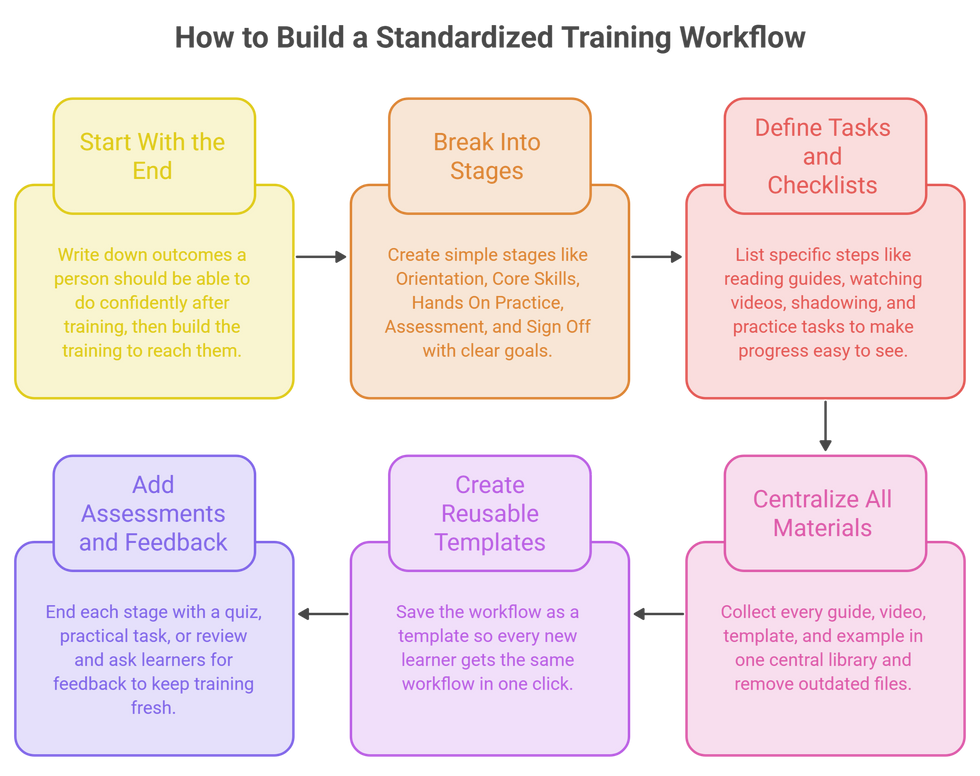
Start With the End in Mind
Ask: "What should a person be able to do confidently after training?" Write down these outcomes first. Then build the training to reach them.
Break Training Into Clear Stages
Create simple stages like Orientation, Core Skills, Hands On Practice, Assessment, and Sign Off. Each stage should have a clear goal.
Turn Every Stage Into Tasks and Checklists
Under each stage, list the specific steps: read this guide, watch this video, shadow this person, complete this practice task. Checklists make progress easy to see.
Put All Materials in One Place
Collect every guide, video, template, and example in one central library. Remove outdated files. These centralized docs become your training home.
Turn It Into a Reusable Template
Once your workflow works, save it as a template. Every new learner gets the same workflow in one click. If you are tired of rebuilding things from scratch, it is time to use templates.
Add Assessments and Feedback
End each stage with a short quiz, practical task, or review. Then ask learners what worked and what didn't. Strong feedback keeps your training fresh and useful.
Where AI Changes the Game
This is the part I am most excited about. A standardized workflow gives everyone the same path. AI makes that path faster to build, easier to follow, and more personal for every learner.
Creating Training Content in Minutes
Writing training guides takes time. AI can turn a few bullet points into a clear, step by step guide, a checklist, or a short quiz. Your experts review it instead of writing from scratch.
Turning Experts' Knowledge Into Documents
Your best people often explain things beautifully in meetings or calls. AI meeting notes can capture these explanations and turn them into training material, so great knowledge is never lost.
Answering Learner Questions Instantly
Instead of waiting for a busy trainer, learners can ask AI, "How do I submit a client report?" and get an answer based on your company's own training documents. Trainers get fewer repeated questions.
Creating Quizzes and Assessments
AI can read a training guide and create simple questions to check understanding. This makes assessments quick to build and easy to update.
Personalizing Learning Paths
AI can help spot where a learner is struggling and suggest extra material or practice. Everyone follows the same standard path, but with support that fits their needs.
Summarizing Progress for Managers
AI can summarize who has completed training, who is behind, and what common questions people are asking. Managers get a clear picture without digging through reports.
For me, AI does not replace trainers. It removes the repetitive work of writing, answering, and reporting, so trainers can focus on what humans do best: coaching, encouraging, and building confidence.
What to Look For in a Training Workflow Tool
Before you choose any project management software for training, check for these basics:
Reusable templates so every learner gets the same workflow
Docs and wikis for training guides and SOPs
Checklists and subtasks to break training into clear steps
Video and screen recording support for how to lessons
Progress tracking for learners and managers
Automations for reminders, assignments, and sign offs
Forms for feedback and quick assessments
Built in AI for creating content, answering questions, and reporting
Easy setup so trainers and learners actually use it
If the tool is confusing, learners will avoid it, and you will be back to random training. Simple always wins.
Why I Recommend ClickUp for Standardized Training Workflows
I have tested many tools with my own team and with clients at IT SARKAR. For standardized training, ClickUp is the one I keep recommending. It brings your training guides, workflows, checklists, videos, progress tracking, and feedback into one place, and it has AI built right in. It works beautifully for HR management, onboarding, and education management, whether you train five people or five hundred.
Here are the ClickUp features that make the biggest difference for consistent learning.
1. ClickUp Templates
What It Is
ClickUp lets you save any task, list, folder, or Doc as a template. When you need it again, you create a full copy in one click, with all the stages, tasks, checklists, and due dates already in place.
How It Helps With Training
Build your training workflow once, with every stage, task, and resource. Save it as a template. Now, every new learner gets the exact same workflow on day one, no matter who their trainer is. You can create different templates for different roles, like Sales Onboarding, Operations Training, or Safety Induction. This is the single most powerful step toward consistency. You can also start from ready made ClickUp templates and adjust them to your needs.
My Tip
Add relative due dates to your template, like "Day 1," "Day 3," and "Week 2." When you apply it, ClickUp sets real dates automatically based on the start date.
2. ClickUp Docs
What It Is
ClickUp Docs are shared documents that live inside your workspace. You can create nested pages, add images, tables, videos, and checklists, and link Docs directly to tasks.
How It Helps With Training
Create a "Training Library" Doc with pages for each department, role, and process. Write SOPs, how to guides, and FAQs in one organized place. Link the right page to each training task, so learners always open the latest version. When a process changes, update the Doc once, and every learner sees the new version instantly.
My Tip
Add a "Last Reviewed" date at the top of each page. Review every training page at least once a quarter, so nothing becomes outdated again.
3. Checklists and Subtasks
What It Is
ClickUp lets you break any task into subtasks and checklists. Subtasks can have their own owners and due dates, while checklists are simple to do items inside a task.
How It Helps With Training
Each training stage becomes a task, and each step becomes a subtask or checklist item. For example, the "Core Skills" task might include: read the client reporting guide, watch the CRM demo, complete one practice report, and get feedback from a senior. Learners know exactly what to do next, and managers can see progress at a glance.
My Tip
Add a final checklist item to every stage: "Trainer sign off." A stage is only complete when the trainer confirms the learner is ready.
4. ClickUp Clips
What It Is
ClickUp Clips let you record your screen and voice directly inside ClickUp. You can share the recording in a task, Doc, or comment, and ClickUp can transcribe it for you.
How It Helps With Training
Many processes are much easier to show than to write. Your best trainer can record a five minute Clip showing exactly how to use a tool or complete a task. Attach it to the training task, and every learner gets the same high quality demo, even if the trainer is busy or away. No more "Sorry, I'll show you later."
My Tip
Keep Clips short, under five minutes, and focus on one skill per recording. Short videos are easier to watch, easier to update, and easier to remember.
5. ClickUp Automations and Forms
What It Is
Automations are simple "when this happens, do that" rules. Forms let you collect structured responses, and each submission becomes a task.
How It Helps With Training
When a new hire's training list is created, ClickUp can assign tasks to the learner and their trainer automatically. When a stage is completed, it can notify the manager and unlock the next stage. When training is finished, it can send a feedback form. Learners answer questions like "What was most useful?" and "What was confusing?", and every response lands in ClickUp for review. Your training improves with every new group.

My Tip
Set a reminder automation for any training task that is three days overdue. Learners get a gentle nudge, and trainers know who might need support.
6. ClickUp Brain (AI)
What It Is
ClickUp Brain is the AI built into ClickUp, and the heart of AI project management in your workspace. It understands your tasks, Docs, comments, and Clips, so you can ask questions in plain language and get answers from your real data.
How It Helps With Training
Trainers can ask Brain to turn rough notes into a clear training guide, create a short quiz from an SOP, or simplify a complex document for beginners. Learners can ask, "How do I prepare the monthly client report?" and get answers from your own training library. Managers can ask, "Who hasn't completed safety training yet?" and get an instant list. With the ClickUp AI Note Taker, explanations from meetings and calls can be captured and turned into training material automatically.

My Tip
After every training cycle, ask Brain to summarize all feedback form responses. Use the top three suggestions to improve your template before the next group joins.
If you want to learn more about ClickUp and Training Workflow, you can connect with ME on LinkedIn
How ClickUp Compares With Other Tools
I always want you to know your options, because every team is different. TalentLMS and Docebo are strong learning management systems for delivering courses, quizzes, and certificates, but they focus on course content and often sit apart from the daily work your team actually does. Trainual is great for documenting SOPs and onboarding steps in a clean way, though it is mainly a training library and needs other tools for projects and collaboration. Moodle is powerful and flexible for schools and institutes, yet it can feel technical to set up and manage for business teams. Notion is flexible for building wikis and training pages, but it lacks strong automations and progress tracking for structured workflows. Asana and Monday.com can handle onboarding checklists and task tracking, but advanced features like automations and reporting often need higher plans, and they don't have built in training docs and video at the same depth.
ClickUp brings the best of all these together in one place: templates, Docs, checklists, Clips, automations, forms, dashboards, and built in AI, all connected to the rest of your team's work, and ClickUp pricing fits growing teams. That is why, after every comparison, it is my top recommendation.
Here is the full Comparison of ClickUp with other tools.
A Simple Way to Get Started in ClickUp
If you want a consistent learning experience for every new hire this month, here is a quick plan:
Pick one role to start with, like Sales or Operations.
Write down what a trained person should be able to do.
Create a List with stages: Orientation, Core Skills, Practice, Assessment, Sign Off.
Add tasks, subtasks, and checklists for each stage.
Build a Training Library Doc and link the right pages to each task.
Record short Clips for processes that are easier to show than explain.
Add Automations for assignments, reminders, and a feedback form at the end.
Save the whole List as a template and use it for every new learner.
Ask ClickUp Brain to create quizzes and summarize feedback.
You can set this up in one or two afternoons. And from that day on, every learner in that role will get the same strong start, no matter who their trainer is.
Conclusion
An inconsistent learning experience is not a people problem. It is a process problem. When training depends on who your trainer is or how busy they are, results depend on luck. I saw this with Ahmed and Hina, two talented people who joined on the same day and had two completely different journeys.
The fix is not more trainers or longer training days. The fix is a standardized training workflow: clear stages, step by step tasks, current materials in one place, progress tracking, and feedback that keeps improving the process. Templates make it repeatable. AI makes it smarter by creating content, answering questions, building quizzes, and summarizing progress in seconds.
There are many good tools out there, and each one has its strengths. But if you want everything in one place, from the first day of training to the final sign off, with AI built in, I truly believe ClickUp is the best choice for most teams.
Start small. Pick one role. Build one workflow. Save it as a template. Let AI handle the writing and reporting. And watch how quickly every new hire becomes confident, consistent, and ready to deliver.
Ready to give every learner the same strong start? Let's build a standardized training workflow your whole team can rely on.
📄 Want to see how IT SARKAR helps teams build better training and workflows? Explore our Corporate Profile to discover our services, clients, and success stories.
👉 Book a free session with me and I'll help you set up ClickUp for consistent, effective training.


Comments