Training Not Tracked? Monitor Progress to Ensure Growth.

A few months ago, we launched a training initiative for our team at IT SARKAR.
Everyone was excited. We picked out courses, shared learning resources, set goals, and told the team to get started.
But we made one critical mistake.
We never tracked any of it.
Weeks later, I asked the team how training was going. The answers were vague. Some people had started but could not remember where they stopped. Others had not started at all. A few had completed courses but could not explain what they learned. The training budget was spent, but we had no way to measure what it had actually achieved.
That experience taught me something important: training without tracking is just activity without growth.
And I know we are not the only ones who have faced this.
Many organizations invest in training but fail to monitor whether employees are actually learning, completing courses, or applying new skills to their work. The training exists, but the progress is invisible.
This is where standardized tracking systems and modern productivity tools change the game.
Instead of relying on memory, scattered spreadsheets, or occasional check-ins, teams can now build structured training workflows where every course, every milestone, and every outcome is tracked in one place.
Among the tools available today, ClickUp stands out because it allows organizations to manage training as a complete workflow, not just a list of links and documents.
And when you add AI into the process, training tracking becomes even more intelligent, helping teams summarize content, organize learning paths, identify gaps, and monitor progress in real time.
The goal is simple:
Every training initiative should have clear visibility into who is learning, what they are learning, how far they have progressed, and what results the training is producing.
What Is Training Progress Tracking?
Training progress tracking is the process of monitoring how employees move through their learning and development activities. It includes knowing which courses or training programs have been assigned, who has started them, how much they have completed, and what results or outcomes they have achieved.
Good training tracking is not just about checking boxes. It gives managers and HR teams a clear picture of whether the organization's training investment is actually leading to skill development, improved performance, and measurable growth.
Without tracking, training becomes an expense with no return. With tracking, it becomes a system that shows exactly where progress is happening and where support is needed.
Modern project management tools have made this process much easier. Instead of maintaining separate spreadsheets or relying on managers to manually follow up, teams can create structured training workflows where tasks, deadlines, progress, and feedback are all connected in one place. AI-powered tools can also help by summarizing training content, identifying learning gaps, organizing resources, and providing insights that would take hours to compile manually. We explored this shift in detail in our article on .
Why Untracked Training Creates Problems
Most organizations do not intentionally ignore training progress. The problem usually starts small: someone forgets to follow up, a spreadsheet goes out of date, or a manager assumes everything is going well because no one complained.
But untracked training creates much bigger problems over time.
1. Employees Lose Motivation
When no one is monitoring progress, employees often lose the motivation to continue. Training feels optional rather than important. Without milestones, deadlines, or check-ins, it becomes easy to push learning to the bottom of the priority list. If your team is struggling with this, our guide on may also help.
People are naturally more committed when they know their progress is visible.
2. Managers Have No Visibility
A manager who does not track training has no way of knowing:
Who has completed their assigned courses
Who is falling behind
What skills the team is developing
Whether training is aligned with business goals
Where additional support is needed
Without this visibility, managers cannot make informed decisions about team development. For a deeper look at aligning work with business direction, read .
3. Training Budgets Are Wasted
Organizations spend significant amounts on training, including courses, subscriptions, workshops, certifications, and coaching. When training is not tracked, there is no way to measure the return on that investment.
Money is spent, but no one can say whether the training led to any measurable improvement. This is why applies just as much to training as it does to projects.
4. Skill Gaps Remain Hidden
Training tracking helps identify which skills are being developed and which are being neglected. Without tracking, skill gaps remain invisible until they create real problems, such as missed deadlines, poor quality work, or employees who cannot handle new responsibilities. For more on identifying and addressing skill gaps, read our article on
5. Compliance and Certification Risks
In many industries, employees must complete specific training for compliance, safety, or certification purposes. If this training is not tracked properly, the organization risks failing audits, losing certifications, or facing legal consequences. If your team works with certifications, our article on is a useful companion read.
6. Onboarding Training Suffers
New employees depend heavily on training during their first weeks and months. If onboarding training is not tracked, new hires may miss critical steps, leading to confusion, slower productivity, and a poor first impression of the organization. We covered this challenge in depth in our article on
What Is a Standardized Training Tracking System?
A standardized training tracking system is a clear, repeatable process that ensures every employee's learning and development activities are monitored consistently. Instead of each manager tracking training differently, or not tracking it at all, the organization follows a structured approach.
This means:
Every training program has defined goals and milestones
Every employee has a clear learning path
Progress is tracked through tasks, deadlines, and completion markers
Managers have visibility into team-wide training status
HR can measure the overall effectiveness of training programs
AI can assist with organizing, summarizing, and analyzing training data
Standardization does not mean every employee follows the exact same training plan. The tracking system remains consistent, while the actual training content can be customized based on the employee's role, department, experience level, and career goals.
The important point is that no training initiative should exist without a way to measure its progress and results.
The Essential Elements of Effective Training Tracking
A strong training tracking system gives managers, HR, and employees clear visibility into the learning process. Instead of guessing whether training is happening, the organization has a structured way to monitor progress, identify gaps, and measure outcomes.
Here are the key elements:
1. Clear Training Goals
Every training program should start with a clear objective. What should the employee know or be able to do after completing the training? Without a defined goal, tracking becomes meaningless because there is nothing to measure progress against. For more on keeping goals front and center, read
2. Structured Learning Paths
Instead of giving employees a random list of courses or resources, create a structured learning path that guides them through the material in a logical order. This helps employees understand what to learn first and what comes next.
3. Milestone-Based Progress
Break training into milestones or checkpoints. Instead of tracking training as "started" or "completed," create intermediate milestones that show how far the employee has progressed. This gives both the employee and the manager a clearer picture of progress.
4. Centralized Training Information
All training resources, courses, documents, schedules, and instructions should be available in one organized place. When information is scattered across emails, shared drives, and chat messages, employees waste time searching instead of learning. Our article on explains why this matters.
5. Assigned Tasks and Deadlines
Every training activity should be converted into a task with an owner and a deadline. This creates accountability and makes it easy to see what has been completed and what is overdue.
6. Regular Check-ins and Feedback
Managers should schedule regular check-ins to discuss training progress, answer questions, and provide feedback. Training tracking is not just about monitoring completion; it is also about understanding whether the employee is actually learning and applying new skills. If you want to explore why feedback matters so much, read .
7. Automation for Repetitive Work
Many training tracking activities are repetitive: sending reminders, assigning standard courses, following up on overdue training, and updating progress. Workflow automation can handle these routine steps so managers and HR teams can focus on more meaningful support.
8. AI Support
AI can make training tracking more intelligent by helping teams summarize course content, identify learning patterns, recommend resources based on skill gaps, create training outlines, and analyze feedback. The goal is not to replace the learning experience but to make the tracking and management of training more efficient.
9. Progress Dashboards
Managers and HR teams need a visual way to see training progress across the team or organization. Dashboards can show completion rates, overdue training, upcoming deadlines, skill development trends, and areas that need attention. For a deeper look at using dashboards effectively, read
10. Post-Training Assessment
Tracking should not end when the course is completed. Organizations should also measure whether the training led to real improvement. This can include assessments, project performance, skill demonstrations, or manager evaluations.
The key idea is simple: training is an investment, and like any investment, it should be tracked, measured, and evaluated. When tracking is standardized and supported by automation and AI, organizations can ensure that training actually leads to growth.
ClickUp for Training Progress Tracking
Tracking employee training should not require a separate platform, additional spreadsheets, or constant manual follow-up. It should be part of the same system where the team already manages its work. This is where ClickUp becomes a powerful solution.
ClickUp is an all-in-one productivity and work management platform that brings tasks, documents, communication, dashboards, goals, automations, and AI into a single workspace. Instead of managing training in a disconnected spreadsheet or relying on emails, organizations can build a complete training tracking system inside the same tool they use for everyday project management.
The real value is not just having features. The value is creating a connected training system where every course, every milestone, every resource, and every result is linked together and visible to everyone who needs to see it.
ClickUp Features That Support Training Tracking
1. Tasks
Training activities can be broken into individual tasks, each with an assignee, deadline, priority, and status. Every course, module, certification, or learning activity becomes a trackable item.
2. Goals and Milestones
ClickUp Goals allow organizations to set measurable training objectives and track progress toward them. Goals can be connected to specific tasks so that progress updates automatically as training activities are completed.

3. Automations
ClickUp Automations reduce the manual effort required to manage training programs. Instead of manually sending reminders, reassigning tasks, or updating statuses, automations handle routine steps automatically.

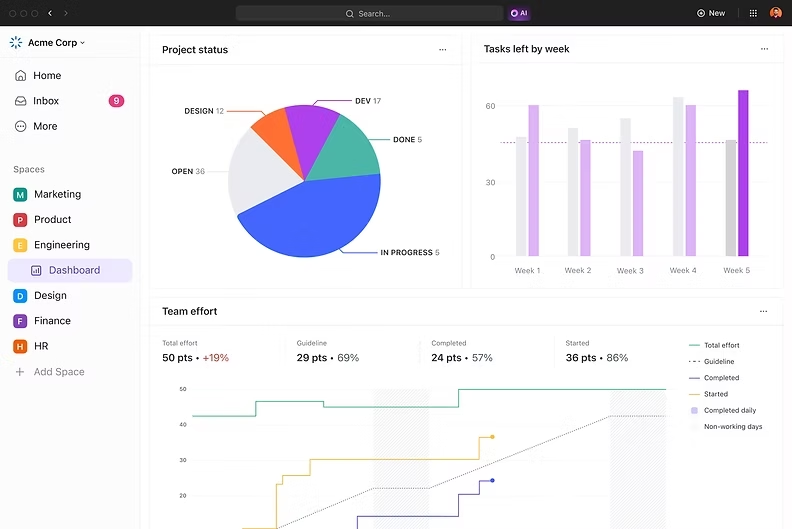
4. Dashboards
ClickUp Dashboards provide a visual overview of training progress across the team or organization. Managers and HR can build custom dashboards that show exactly the training metrics that matter most.
5. Time Tracking
ClickUp Time Tracking allows employees to log the time they spend on training activities. This helps organizations understand how much time is being invested in learning and development.

6. ClickUp Brain (AI)
ClickUp Brain is the built-in AI assistant that helps teams work smarter. For training tracking, AI can reduce administrative work and help both managers and employees get more value from training.

Why ClickUp Makes Sense for Training Tracking
The biggest advantage of using ClickUp for training tracking is connection.
Training tasks connect with the documents employees need. Documents connect with the goals they support. Automations keep the process moving. Dashboards show the big picture. Time tracking measures the investment. Forms collect feedback. And AI helps everyone find, organize, and understand information faster.
Instead of treating training as a separate activity managed in a different tool, ClickUp allows organizations to integrate training tracking into their existing workflow. Training becomes part of the team's daily work, not an afterthought managed in a forgotten spreadsheet.
That is the difference between tracking training and actually using training data to drive growth.
If you want to learn more about ClickUp and Productivity Management, you can connect with ME on LinkedIn.
How AI Can Improve Training Tracking
AI is not just a feature to mention in passing. It is changing the way organizations think about employee development.
Traditionally, training tracking meant someone in HR manually updating a spreadsheet, sending reminder emails, and hoping managers would follow up. AI changes this entirely.
Here is how AI can improve training tracking:
Creating Training Plans: AI can generate structured training outlines based on an employee's role, skill level, and learning objectives
Summarizing Content: Long courses, documents, and meeting recordings can be summarized by AI so employees can quickly review key points
Identifying Skill Gaps: AI can analyze training completion data and performance metrics to identify where skill gaps exist
Personalizing Learning Paths: AI can recommend courses or resources based on what an employee has already completed and what they still need to learn
Automating Progress Reports: Instead of manually compiling training reports, AI can generate summaries that show completion rates, trends, and areas needing attention
Answering Questions: AI assistants can help employees find training information, navigate resources, and understand company processes without waiting for HR
Analyzing Feedback: Post-training surveys and feedback can be analyzed by AI to identify common themes, positive patterns, and areas for improvement
Predicting Training Needs: AI can analyze team performance and project demands to predict future training needs before skill gaps become problems
For a broader perspective on how data-driven decisions improve outcomes, our article on covers useful strategies.
The important point is that AI should support people, not replace them. A manager still needs to have real conversations about growth and career development. AI simply makes sure the data, organization, and follow-up happen efficiently so those conversations are more meaningful.
The Manager's Role in Training Progress
No matter how advanced the tools become, a manager's involvement in employee training remains irreplaceable.
A workflow can remind a manager to check on training progress, but it cannot create the trust and motivation that come from a real conversation.
Managers should still:
Set clear training expectations for each team member
Explain why specific training matters for the employee's role and growth
Schedule regular check-ins to discuss progress and challenges
Provide feedback on how new skills are being applied
Recognize and celebrate training completion
Remove obstacles that prevent employees from completing training
Connect training to career development opportunities
Use training data to have informed development conversations
If you want to improve how your team handles regular check-ins, our article on offers practical advice.
The tracking system should make these activities easier to manage and remember. It should not make them feel automated or impersonal.
The best training tracking system is one where the tools handle the logistics and the manager handles the human connection.
Building a Training Tracking Workflow Step by Step
A good training tracking workflow gives managers and HR a clear system for monitoring employee development. Instead of hoping that training happens, the organization builds a process that ensures progress is visible, measurable, and consistent.

Step 1: Define Training Objectives
Before assigning any training, define what the organization wants to achieve. Are you building technical skills? Improving leadership? Meeting compliance requirements? Onboarding new employees? Clear objectives guide everything else.
Step 2: Create a Master Training List
Build a central list of all training programs, courses, certifications, and learning resources available to the team. Organize them by category, department, skill level, or role. This becomes the foundation of the training system.
Step 3: Assign Training as Tasks
Convert each training activity into a task with a clear owner, deadline, and priority. This transforms training from a suggestion into a responsibility. Employees know exactly what they need to complete and by when.
Step 4: Build Structured Learning Paths
For each role or department, create a structured learning path that guides employees through their training in a logical order. New hires follow an onboarding path. Existing employees follow development paths based on their goals and skill gaps.
Step 5: Set Milestones and Checkpoints
Break longer training programs into milestones. Instead of marking training as simply "done" or "not done," create intermediate checkpoints that show gradual progress. This keeps employees motivated and gives managers better visibility.
Step 6: Centralize Training Resources
Put all training materials, documents, links, instructions, and guides in one organized location. When employees can find everything they need in one place, they spend less time searching and more time learning. AI can help organize and summarize these resources.
Step 7: Automate Reminders and Follow-ups
Set up automations to remind employees about upcoming deadlines, notify managers about overdue training, and move tasks forward as milestones are completed. This removes the need for constant manual follow-up.
Step 8: Schedule Manager Check-ins
Training tracking is not just about task completion. Schedule regular check-ins where managers discuss progress, challenges, and how new skills are being applied. These conversations turn training data into meaningful development discussions. If your team struggles with meeting overload, read for better approaches.
Step 9: Track and Visualize Progress
Use dashboards or progress views to monitor training across the team. Managers should be able to see at a glance who is on track, who is behind, and where the organization stands on its training goals. A project management platform such as ClickUp can bring all of this into one workspace.
Step 10: Collect Feedback and Improve
After each training cycle, gather feedback from employees about the training quality, relevance, and tracking process. Use AI to analyze patterns in the feedback and identify improvements. The training system should evolve based on real experience.
How This Looks in Practice
For example, a company training its marketing team on AI-powered content tools could build a workflow like this:
Before Training → Define objectives → Select courses → Assign tasks → Share resources
Week 1 → Introductory modules → Tool setup → First practice exercise → Manager check-in
Week 2-3 → Advanced modules → Hands-on projects → Peer review → Progress checkpoint
Week 4 → Final assessment → Feedback survey → Completion review → Goals for application
The workflow is standardized, but the content can be customized for each employee's experience level and role.
Creating a 30-60-90 Day Training Plan
A 30-60-90 day training plan provides a structured timeline for employee learning and development. Instead of giving someone a list of courses and hoping for the best, the plan breaks training into three clear stages.
First 30 Days: Foundation and Core Skills
The first month focuses on essential knowledge and foundational training.
Employees should:
✅ Complete mandatory onboarding training
✅ Understand core tools and processes
✅ Review company policies and procedures
✅ Complete role-specific introductory training
✅ Meet with their manager to discuss training expectations
✅ Begin tracking progress in the training workflow
The goal is to build a strong foundation. The employee should understand the basics of their role and the organization.
Days 31-60: Applied Learning and Skill Development
The second stage is about putting knowledge into practice.
Employees should:
✅ Complete intermediate training courses
✅ Apply new skills to real projects
✅ Participate in team training sessions or workshops
✅ Receive feedback from their manager on skill application
✅ Identify areas where additional training is needed
✅ Track and report their own progress
The goal is to move from learning to doing. Employees start using their training in real work situations.
Days 61-90: Ownership and Measurable Growth
By the third month, the focus shifts to independence and measurable results.
Employees should:
✅ Complete advanced or specialized training
✅ Demonstrate new skills through projects or assessments
✅ Set personal development goals for the next quarter
✅ Provide feedback on the training program
✅ Discuss long-term career development with their manager
✅ Achieve specific, measurable training outcomes
The goal is to see real results. The employee should be visibly more skilled and confident than they were 90 days ago.
Why This Works
A 30-60-90 day plan gives structure to what is often an unstructured process. Every employee knows what to focus on, every manager knows what to measure, and the organization has a clear timeline for development.
Using a project management system such as ClickUp, the entire plan can be organized into tasks, milestones, deadlines, and dashboards. AI can assist with creating the plan, organizing resources, and generating progress summaries.
30 days = Learn the foundations
60 days = Apply and contribute
90 days = Own and demonstrate growth
Common Training Tracking Mistakes to Avoid
Even organizations with the best intentions make mistakes when tracking training. Here are the most common ones.
Mistake 1: Assigning Training Without Clear Goals
If employees do not understand why they are completing a course, they will treat it as a checkbox exercise rather than a learning opportunity. Always explain the purpose and expected outcome of every training activity.
Mistake 2: Tracking Completion Only, Not Learning
Completing a course does not always mean the employee learned something useful. Track not only whether training was finished but also whether new skills are being applied. Use assessments, projects, or manager evaluations to measure real learning.
Mistake 3: Using Spreadsheets Instead of a Proper System
Spreadsheets work for small teams, but they quickly become outdated, difficult to maintain, and impossible to scale. A structured training workflow in a project management tool is far more reliable and efficient. Our article on shows how far these systems have come.
Mistake 4: No Deadlines on Training Activities
Without deadlines, training becomes something employees plan to do "eventually." Deadlines create accountability and urgency. They also help managers identify overdue training before it becomes a problem. For practical tips on managing time, read .
Mistake 5: Ignoring Employee Feedback on Training
Employees are the best source of information about whether training is useful, relevant, and well-organized. Organizations that never ask for feedback miss opportunities to improve.
Mistake 6: Making Training a One-Time Event
Training should be continuous, not a single event during onboarding. Organizations that invest in ongoing development build stronger teams and retain employees longer. To understand the skills that matter most for ongoing growth, read .
Mistake 7: Not Connecting Training to Career Growth
Employees are more motivated to complete training when they can see how it connects to their career goals. Make the connection between training and advancement clear.
ClickUp vs Other Productivity and Project Management Tools
Several tools can help organizations track training progress. Here is how the leading options compare. For a broader look at the tools landscape, our articles on and are helpful companions.
Several tools can help organizations track training progress: Asana offers clean task management but lacks built-in docs, goals, time tracking, and AI; Monday.com provides visually appealing boards and automations but falls short on document management and deep customization; Notion excels at documentation and knowledge bases yet misses advanced task management, automations, dashboards, and time tracking; Jira is powerful for technical teams but its steep learning curve and development-focused design make it less ideal for general training management.
ClickUp stands apart as the most comprehensive option, combining tasks, docs, goals, dashboards, automations, time tracking, forms, and AI (ClickUp Brain) into one workspace, letting organizations build, track, and improve their entire training system without juggling multiple platforms. While every organization has different needs and the best tool is the one that fits your workflow, we recommend ClickUp as the preferred tool for training tracking for its unmatched all-in-one capability.
Here's the full Comparison of ClickUp with other tools.
The Future of Training Is AI-Assisted, Not AI-Replaced
AI is rapidly changing how organizations approach employee training and development. But the future of training is not about replacing human learning with artificial intelligence. It is about using AI to make the entire training process smarter, faster, and more effective.
In the near future, we will see:
AI that automatically identifies skill gaps based on project performance and recommends specific training
Intelligent training paths that adapt based on how quickly an employee learns
AI-powered summaries that condense hours of training content into key takeaways
Automated progress tracking that requires zero manual input
AI assistants that answer employee questions using the organization's own training materials
Predictive analytics that forecast future training needs based on business direction
But here is what AI will not replace: the human side of growth.
A manager encouraging an employee after a tough project, a team celebrating a colleague's new certification, a mentor sharing real-world experience that no course can teach. These moments are what make training meaningful.
AI handles the logistics. People handle the growth.
The organizations that understand this balance will build the strongest teams.
Final Thoughts: Track the Training, Measure the Growth
If your organization invests in training but does not track it, you are spending money without measuring the return.
If your employees complete courses but no one monitors whether those skills are being applied, you have activity without growth.
If your managers do not have visibility into training progress, they cannot support development effectively.
Training tracking is not about micromanagement. It is about creating a system where:
Employees know what they need to learn and by when
Managers can see progress and provide timely support
HR can measure the effectiveness of training programs
The organization can connect training investment to real business results
When you combine a standardized training workflow with the right productivity tools and AI, you create an environment where learning is visible, measurable, and meaningful.
ClickUp can help you build this system. Its workspace brings tasks, documents, goals, automations, dashboards, time tracking, and AI together so your training program works as a connected system rather than a collection of disconnected activities.
Conclusion
Training that is not tracked will always struggle to produce consistent results. Not because the training itself is bad, but because without tracking, there is no way to know what is working, what is not, and where support is needed.
Standardized training workflows solve this problem. They create a clear system that every employee, manager, and HR team member can follow. Add automation, and the repetitive administrative work becomes effortless. Add AI, and teams can organize, summarize, analyze, and improve training faster than ever before.
The result is not just better training. It is better growth.
Employees develop real skills. Managers make informed development decisions. Organizations see a measurable return on their training investment.
And it all starts with a simple shift: stop hoping training is happening and start tracking it.
If you are ready to build a better training system for your team, explore what we are doing at IT SARKAR. We help organizations use productivity tools, AI, and structured workflows to turn good intentions into real results.
Your training program is only as strong as your ability to track it. Make sure every hour of learning counts.
Book a free strategy session with us and we'll show you exactly how to turn your training program into a trackable, measurable system that drives results.


Comments