Teams Working in Silos? Cross-Functional Workflows Boost Collaboration.

Have You Ever Wondered Why Great Teams Still Struggle?
I've worked with organizations of different sizes, and I've noticed one common problem. Many businesses hire talented people, invest in modern software, and set ambitious goals, yet projects still get delayed. Deadlines are missed. Communication breaks down. Departments blame each other instead of solving problems together.
The problem usually isn't a lack of talent.
It's the presence of work silos.
When marketing doesn't know what sales is doing, when developers don't receive clear requirements, when HR is disconnected from operations, and when leadership doesn't have visibility into daily progress, productivity drops quickly.
The good news is that this problem has a solution.
Modern cross-functional workflows, combined with AI-powered project management, are changing how organizations work. Instead of departments operating independently, everyone collaborates in one connected workspace where information flows naturally, decisions are faster, and projects move forward without unnecessary delays.
In this article, I'll explain what work silos are, why they slow organizations down, how cross-functional workflows solve these problems, and why ClickUp has become one of
my favorite solutions for bringing teams together.
What Are Work Silos?
Every department has its own responsibilities.
Marketing creates campaigns.
Sales talks to customers.
HR hires employees.
Finance manages budgets.
Operations keep everything running.
Product teams develop solutions.
The problem begins when these departments work independently without sharing information.
This creates organizational silos.
Each team focuses only on its own goals instead of understanding the organization's overall objectives.
As a result:
Communication becomes slower.
Information gets lost.
Duplicate work increases.
Teams blame one another.
Customers receive inconsistent experiences.
Projects take longer to complete.
This is one of the biggest reasons businesses lose productivity.
Why Do Teams End Up Working in Silos?
Many people believe silos are caused by poor employees.
That's rarely true.
Most silos are created because organizations lack connected systems.
Common reasons include:
Using Too Many Different Tools
One department uses email.
Another uses spreadsheets.
Another uses messaging apps.
Someone else manages tasks somewhere else.
Information becomes scattered.
Poor Communication
Without centralized communication, updates remain inside departments instead of reaching everyone involved.
Unclear Responsibilities
People often don't know who owns specific tasks.
This leads to confusion and delays.
Limited Visibility
Managers cannot see project progress across departments.
Problems remain hidden until deadlines are missed.
Manual Processes
Teams spend hours sending updates instead of actually completing work.
What Are Cross-Functional Workflows?
Cross-functional workflows connect multiple departments inside one process.
Instead of marketing finishing work before handing it to another team, everyone collaborates throughout the project lifecycle.
Every stakeholder knows:
What needs to be done
Who is responsible
Current progress
Upcoming deadlines
Everyone works toward the same business objective.
Why Cross-Functional Collaboration Matters More Than Ever
Today's businesses move much faster than they did just a few years ago.
Customers expect quicker responses.
Markets change rapidly.
AI technologies continue evolving.
Remote and hybrid work have become common.
Organizations cannot afford disconnected teams anymore.
Cross-functional collaboration creates:
Faster decision making
Better customer experiences
Higher employee engagement
Greater accountability
Stronger project outcomes
When departments collaborate instead of competing, the entire business becomes more productive.
How AI Is Transforming Cross-Functional Work
Artificial Intelligence is no longer just a tool for automation.
It has become an intelligent teammate.
Instead of replacing people, AI helps teams work together more effectively.
AI can:
Summarize meetings
Create project updates
Identify delays before they happen
Prioritize work automatically
Suggest workload balancing
Generate reports
Write documentation
Recommend next actions
Instead of spending hours organizing work, teams spend more time creating value.
Common Challenges Without Cross-Functional Workflows
Communication Delays
Departments wait for emails.
Updates arrive too late.
Projects slow down.
Duplicate Work
Different teams unknowingly complete the same tasks.
Resources are wasted.
Confusing Priorities
Every department believes its work is most important.
No one understands the complete picture.
Missed Deadlines
Without visibility, dependencies are overlooked.
One delay creates several more.
Poor Customer Experience
Customers interact with multiple departments.
If those departments don't communicate, customers notice immediately.
The Role of ClickUp in Cross-Functional Collaboration
When I help organizations improve productivity, I always emphasize one principle.
Keep work in one place.
That's exactly where ClickUp excels.
ClickUp isn't simply another task manager.
It's a complete work platform where departments collaborate inside a shared workspace.
Instead of switching between multiple applications, everything happens in one connected environment.
Marketing, HR, Finance, Sales, Product Development, Customer Support, Operations, and Leadership all stay connected.
If you want to learn more about ClickUp and Productivity Management, you can connect with ME on LinkedIn.
How ClickUp Breaks Down Organizational Silos
One Workspace for Every Department
Each department can maintain its own workflow while remaining connected to company-wide objectives.
Everyone works differently.
Everyone stays connected.
Shared Goals
Business goals become visible across departments.
Every employee understands how their work contributes to company success.

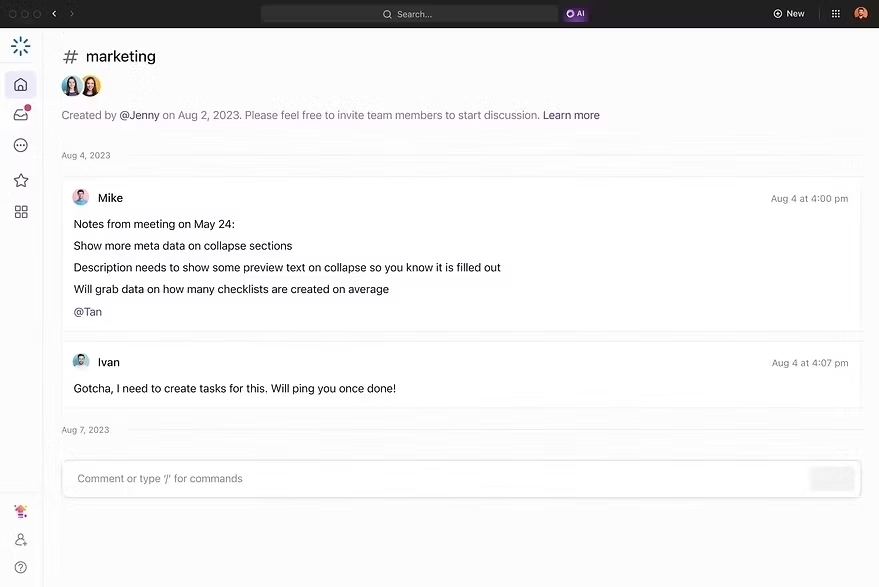
Real-Time Collaboration
Comments, documents, updates, approvals, files, and conversations remain attached to the relevant work.
No more searching through endless emails.
AI-Powered Project Assistance
ClickUp AI helps teams by:

Writing summaries
Creating meeting notes
Drafting documents
Generating project plans
Producing status updates
Answering project questions
Creating task descriptions
AI removes repetitive administrative work.
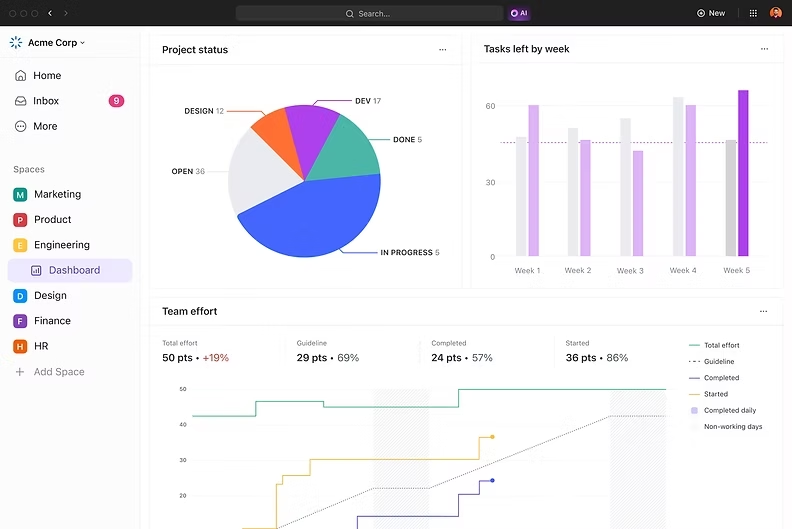
Smart Dashboards
Executives gain real-time visibility into every department.
Instead of waiting for weekly reports, leaders immediately understand project health.
Workflow Automation
Routine activities happen automatically.
For example:
Assign new tasks
Notify stakeholders
Update statuses
Send reminders
Trigger approvals
Automation allows employees to focus on meaningful work.

Benefits of Cross-Functional Workflows
Cross-functional workflows help different departments work together instead of operating separately. When everyone shares the same goals, information, and progress, projects move faster and with fewer mistakes. AI-powered project management tools like ClickUp make this collaboration even easier by connecting teams, automating routine work, and providing real-time visibility into every project.
Better Communication
Cross-functional workflows improve communication by giving every team access to the same information. Instead of relying on long email chains or multiple meetings, employees can share updates, discuss tasks, and collaborate in one place, reducing misunderstandings and keeping everyone aligned.
Faster Decision-Making
When all departments have access to real-time project data, managers and team leaders can make informed decisions more quickly. AI-powered insights also highlight risks, delays, and priorities, helping organizations respond faster to changing business needs.
Higher Productivity
Employees spend less time searching for information or waiting for updates because everything is organized in a single workspace. Automation handles repetitive tasks such as reminders, status updates, and notifications, allowing teams to focus on more valuable work.
Better Resource Management
Cross-functional workflows make it easier to see workloads across departments. Managers can balance tasks, allocate resources more effectively, and prevent some team members from becoming overloaded while others have unused capacity.
Greater Transparency
Everyone can see project progress, responsibilities, and deadlines in real time. This transparency builds accountability, reduces confusion, and helps teams identify potential issues before they become major problems.
Improved Collaboration
Departments such as marketing, sales, HR, operations, finance, and product development can work together more effectively when they share the same platform. This encourages teamwork, improves knowledge sharing, and leads to better project outcomes.
Increased Innovation
When employees from different departments collaborate, they bring unique ideas and perspectives to the table. This exchange of knowledge encourages creativity, helps solve problems more effectively, and leads to innovative solutions.
Better Customer Experience
Connected teams provide faster responses and more consistent service because customer information and project updates are shared across departments. This improves communication with customers and helps deliver a smoother overall experience.
Smarter Work with AI
AI enhances cross-functional workflows by generating meeting summaries, drafting reports, suggesting task priorities, automating routine processes, and identifying potential bottlenecks. This helps teams work more efficiently while allowing employees to focus on strategic and creative tasks.
Business Growth and Scalability
As organizations grow, managing multiple departments becomes more challenging. Cross-functional workflows provide a structured system that scales with the business, making it easier to manage larger teams, more projects, and increasing workloads without losing efficiency.
Best Practices for Building Cross-Functional Workflows
Building effective cross-functional workflows requires more than simply bringing different departments together. Organizations need clear processes, open communication, and the right technology to ensure everyone works toward the same goals. AI-powered project management platforms like ClickUp make this process easier by connecting teams, automating repetitive work, and providing complete visibility into every stage of a project. The following best practices can help businesses create stronger collaboration and improve overall productivity.

Create Shared Objectives
Every department may have different responsibilities, but they should all work toward the same organizational goals. Shared objectives help teams understand how their work contributes to the bigger picture, reducing conflicts and encouraging collaboration. When everyone focuses on business success instead of individual achievements, projects move forward more efficiently and teams make better decisions together.
Standardize Communication
Consistent communication is essential for successful collaboration. Instead of relying on scattered emails, chat messages, or spreadsheets, keep discussions, documents, and updates within a centralized project workspace. This ensures that every team member has access to the latest information, reduces misunderstandings, and makes it easier to track project progress from start to finish.
Automate Repetitive Processes
Routine tasks such as assigning work, sending reminders, updating task statuses, and generating reports consume valuable time. AI and workflow automation can handle these repetitive activities automatically, allowing employees to focus on problem-solving, innovation, and high-value work. Automation also reduces human error and keeps projects moving without unnecessary delays.
Improve Visibility
Every stakeholder should have a clear understanding of project progress, deadlines, responsibilities, and potential risks. Real-time dashboards, progress reports, and AI-generated insights help managers and team members stay informed without constantly requesting updates. Greater visibility improves accountability, supports faster decision-making, and helps identify issues before they affect project success.
Encourage Collaboration Early
Cross-functional collaboration should begin during the planning stage rather than after work has already started. Involving all relevant departments early helps identify challenges, align expectations, and ensure everyone understands their responsibilities. Early collaboration reduces rework, improves communication, and creates a smoother workflow throughout the entire project lifecycle.
Why I Recommend ClickUp
I've evaluated many productivity platforms over the years.
Some specialize in communication.
Some focus on task management.
Others emphasize documentation or automation.
Very few successfully combine all these capabilities into one intelligent workspace.
ClickUp brings together project management, collaboration, AI assistance, documentation, dashboards, workflow automation, goal tracking, reporting, CRM capabilities, and cross-functional collaboration in one platform.
For organizations wanting to eliminate silos and improve productivity, this combination creates tremendous value.
ClickUp Compared with Other Project Management Tools
Several excellent project management platforms are available today, including Asana, Monday.com, Trello, Jira, Wrike, Notion, Microsoft Planner, and Basecamp. Each offers useful features depending on the type of organization and workflow.
Some platforms are excellent for visual task management, while others are designed primarily for software development, note-taking, or team communication. Many businesses eventually find themselves using several different applications to cover all of their needs.
ClickUp approaches productivity differently. Instead of separating project management, documentation, AI, dashboards, collaboration, automation, goals, CRM capabilities, and reporting into multiple products, it combines them in one connected workspace. This reduces tool switching, improves visibility across departments, and makes collaboration much easier.
Here's the full Comparison of ClickUp with other tools.
Final Thoughts
Teams don't fail because they lack talent.
They struggle because information becomes trapped inside departments.
Cross-functional workflows remove those barriers.
When marketing collaborates with sales, operations work closely with HR, product teams stay connected with customer support, and leadership has complete visibility, organizations become faster, smarter, and more productive.
Artificial Intelligence makes this transformation even more powerful. It automates repetitive work, generates valuable insights, reduces manual effort, and allows people to focus on solving real business challenges.
Among the many productivity platforms available today, ClickUp continues to stand out because it combines collaboration, AI, automation, documentation, reporting, and project management into one intelligent workspace. It helps organizations replace disconnected systems with connected workflows that support long-term growth.
The future of work isn't about departments working independently.
It's about everyone working together—with AI helping every step of the way.
At IT SARKAR, we help organizations implement AI-powered ClickUp workflows that improve collaboration, automate processes, and increase productivity.
Want to optimize your workflows with ClickUp and AI? Book a one-on-one strategy session with me, Yasir Ali Warraich, and let's create a smarter way for your team to work.


Comments