Ideas Getting Lost? Centralized Idea Boards Capture Every Insight.

Last year, during a long drive back from a client meeting, one of my team members said something that made me pull the car over.
"Yasir, what if we turned our training sessions into short weekly video lessons for clients?"
It was brilliant. Simple, useful, and exactly what our clients needed. I said, "Yes! Let's do this." We both got excited, talked about it for twenty minutes, and then... we reached the office, opened our laptops, and got pulled into emails and deadlines.
Three months later, I saw a competitor launch the exact same idea.
I felt sick. Not because they copied us. They didn't even know about it. I felt sick because we had the idea first, and we lost it. It wasn't written anywhere. No note, no task, no board. It lived in a car conversation, and it died there.
That day I made a rule for my team at IT SARKAR: an idea that is not captured is an idea that is lost.
If you have ever said, "Wait, didn't someone suggest this before?" in a meeting, you know this pain. Great ideas show up everywhere: in meetings, in chats, in the shower, on a drive home. The problem is not that teams lack ideas. The problem is that they have no single place to keep them.
In this article, I will explain why ideas get lost, what a centralized idea board is, how it helps your team capture and grow every insight, where AI makes the process smarter, and which tools can help. I will also share why I recommend ClickUp to the teams I coach at IT SARKAR.
Why Ideas Get Lost
Most teams are full of creative people. Yet so many good ideas never see the light of day. Here is what usually goes wrong.
Ideas Are Shared in Passing
Someone mentions an idea in a hallway chat, a quick call, or at the end of a meeting. Everyone nods. Nobody writes it down. By next week, it is forgotten.
Ideas Live in Too Many Places
One person keeps ideas in a notebook. Another uses phone notes. Someone else drops them in a chat group where they get buried under 200 messages. When ideas are scattered, nobody can see the full picture.
Quiet Voices Don't Get Heard
In many meetings, the loudest person's idea wins. Shy team members, new joiners, and remote staff often have great thoughts but never share them because there is no easy, safe way to do it.
No One Owns the Follow Up
Even when an idea is written down, nobody is responsible for reviewing it. It sits in a document forever, with no decision, no feedback, and no next step.
There Is No Way to Compare Ideas
When you have twenty ideas and no way to score them, choosing the right one feels like guesswork. So teams either pick randomly or pick nothing at all.
The Real Cost of Lost Ideas
It is easy to think a lost idea is "no big deal." It is a much bigger deal than most leaders realize.
You Lose Opportunities
That one lost idea might have been your next product, your next big client win, or a process change that saves hundreds of hours. You will never know.
Your Team Stops Sharing
When people share ideas and nothing happens, they stop trying. Slowly, your team goes from creative to quiet. That is one of the biggest silent killers of innovation.
You Repeat the Same Discussions
Without a record, teams discuss the same ideas again and again. Meetings get longer, and decisions get slower.
Competitors Move Faster
Ideas are not rare. Execution is. The team that captures, reviews, and acts on ideas fastest usually wins.
What Is a Centralized Idea Board, Really?
Let me keep it simple. A centralized idea board is one shared place where everyone on your team can add, see, discuss, and track ideas.
Think of it like a big notice board in your office, but digital, organized, and always with you. Every idea gets its own card. Each card shows who suggested it, what it is about, how people feel about it, and what stage it is in.
A good idea board helps you:
Capture ideas the moment they come up, from anywhere
Keep every idea in one place, so nothing gets lost
Let everyone contribute, including quiet and remote team members
Discuss and improve ideas with comments and votes
Score and prioritize ideas based on value and effort
Move the best ideas into real projects with owners and deadlines
The goal is not just to collect ideas. The goal is to turn the best ones into action.
How Centralized Idea Boards Capture Every Insight
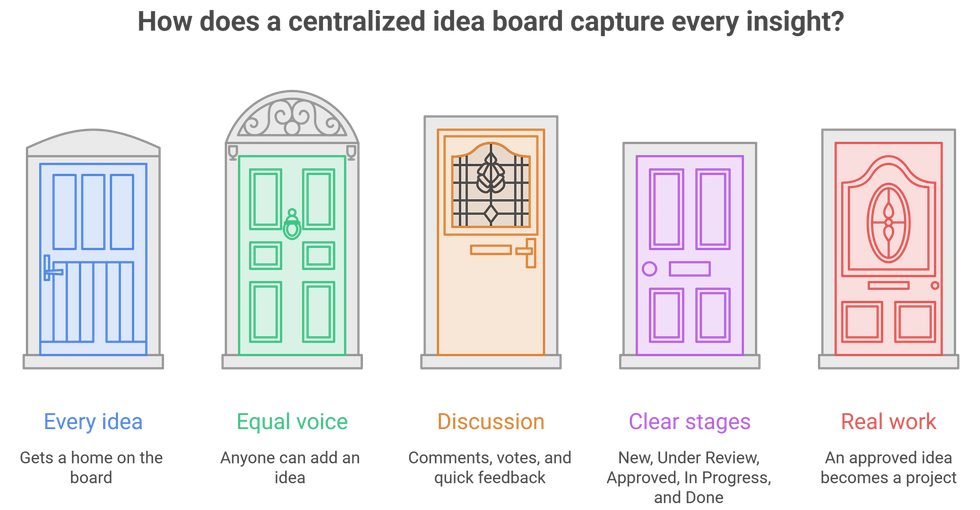
Every Idea Gets a Home
When there is one clear place for ideas, people know exactly where to put them. No more "I told someone in a meeting." If it is not on the board, it does not exist.
Everyone Gets an Equal Voice
A digital board lets anyone add an idea at any time, without waiting for a meeting or speaking up in front of a crowd. Some of the best ideas I have seen came from the quietest people in the room. Strong collaboration starts when everyone feels heard.
Ideas Grow Through Discussion
One person's small idea becomes a great one when others add to it. Comments, votes, and quick feedback help an idea get sharper over time.
Clear Stages Show Progress
Give your board simple stages like New, Under Review, Approved, In Progress, and Done. Now everyone can see which ideas are moving and which are waiting.
Good Ideas Turn Into Real Work
The magic happens when an approved idea becomes a project with an owner, a deadline, and clear steps. That is how ideas stop being "nice thoughts" and start becoming results. It also connects nicely to your project roadmap.
Where AI Changes the Game
This is the part I am most excited about. An idea board collects ideas. AI helps you understand, organize, and grow them.
Capturing Ideas From Meetings Automatically
Many great ideas come up in meetings, and most of them are never written down. AI meeting notes can record the conversation, pull out the ideas and action items, and save them for you. Nobody has to be the note taker.
Grouping Similar Ideas
When you have 100 ideas, many of them overlap. AI can read through them and group similar ones together, so you see the big themes instead of a messy list.
Summarizing Long Discussions
Some ideas spark long comment threads. AI can summarize the whole discussion in a few lines: what the idea is, what people liked, what concerns came up, and what the next step should be.
Helping You Develop Ideas Further
Stuck with a half formed idea? AI can help you brainstorm, suggest improvements, list possible risks, and even draft a simple project plan to get started.
Helping You Prioritize
AI can help you compare ideas based on impact, effort, and goals, so you focus on the ones that matter most. Good task prioritization is what turns a long list of ideas into a short list of wins.
For me, AI does not replace human creativity. People still have the ideas. AI just makes sure none of them get lost, and helps the best ones grow faster.
What to Look For in an Idea Board Tool
Before you choose any project management software for ideas, check for these basics:
Easy idea capture from desktop, mobile, chat, and meetings
Visual boards where ideas can move through clear stages
Comments and voting so the team can discuss and support ideas
Custom fields to score ideas by impact, effort, and category
Whiteboards for live brainstorming sessions
Built in AI for summarizing, grouping, and developing ideas
A simple path from idea to real project with owners and dates
Easy setup so your team actually uses it
If adding an idea takes more than thirty seconds, people will stop doing it. Simple always wins.
Why I Recommend ClickUp for Centralized Idea Boards
I have tested many tools with my own team and with clients at IT SARKAR. For capturing and managing ideas, ClickUp is the one I keep recommending. It lets you brainstorm, collect, discuss, score, and turn ideas into real projects, all in one place, with AI built right in. Your ideas don't sit in a separate app far away from your work. They live right next to it. It is also a great fit for product management, where every feature starts as an idea.
Here are the 5 ClickUp features that make the biggest difference for capturing every insight.
1. ClickUp Whiteboards
What It Is
ClickUp Whiteboards are digital canvases where your team can brainstorm together in real time. You can add sticky notes, shapes, drawings, images, and connectors, just like a real whiteboard, but online.
How It Helps With Ideas
Run a live brainstorming session with your team, whether they are in the office or working from home. Everyone adds sticky notes at the same time. Then you group them, discuss them, and here is the best part: you can turn any sticky note into a real ClickUp task with one click. No more taking photos of a whiteboard and forgetting about them.
My Tip
Start every brainstorm with five minutes of silent idea writing on the Whiteboard. This gives quiet team members space to share before the louder voices take over.
2. ClickUp Forms
What It Is
ClickUp Forms let you create a simple online form that anyone can fill. Every time someone submits the form, ClickUp creates a new task automatically with all the details inside.
How It Helps With Ideas
Create an "Idea Submission" form with questions like Idea Title, Problem It Solves, Who It Helps, and Category. Share the link with your team, or even with clients and partners. Every submission lands on your idea board as a new card, ready for review. Anyone can share an idea in under a minute, from their phone or laptop.
My Tip
Keep the form to four or five questions. Pin the link in your team channel on ClickUp Chat so it is always one click away.
3. Board View With Custom Fields
What It Is
Board View shows your tasks as cards that move across columns, like a visual Kanban board. Custom Fields let you add your own information to each card, like scores, categories, and owners.
How It Helps With Ideas
This becomes your actual idea board. Set columns like New, Under Review, Approved, In Progress, and Done. Add Custom Fields for Impact Score, Effort Score, Category, and Idea Owner. Team members can comment and vote on ideas right on the card. Now you can sort ideas by score and see at a glance which ones are worth building. If you love visual boards, you'll enjoy my guide on understanding Kanban.

My Tip
Use a simple 1 to 5 scale for Impact and Effort. Ideas with high impact and low effort are your quick wins. Start there.
4. ClickUp Chat
What It Is
ClickUp Chat is the built in messaging space inside ClickUp. You can create channels for teams or topics and talk in real time, right next to your tasks and docs.
How It Helps With Ideas
Create an "Ideas" channel where people can share thoughts as they come. When a message has a great idea, you can turn it into a task right from the chat, and it lands on your idea board with the original message linked. This means ideas from casual conversations are captured instead of getting buried under hundreds of messages.

My Tip
Once a week, scroll through your Ideas channel and turn the best messages into tasks. It takes ten minutes and saves ideas that would otherwise vanish.
5. ClickUp Brain (AI)
What It Is
ClickUp Brain is the AI built into ClickUp, and the heart of AI project management in your workspace. It understands your tasks, docs, chats, and comments, so you can ask questions in plain language and get useful answers from your real data.
How It Helps With Ideas
You can ask Brain, "What are the top themes in our idea board this month?" or "Summarize the feedback on this idea." It can group similar ideas, summarize long discussions, help you expand a rough idea into a clear proposal, and even draft a project plan for approved ideas. With the ClickUp AI Note Taker, ideas from your meetings are captured automatically, so nothing said in a meeting is ever lost again.

My Tip
At the end of each month, ask Brain to list the five most promising ideas based on votes and scores. Review them with your team and pick one to start.
If you want to learn more about ClickUp and Centralized Idea Boards, you can connect with ME on LinkedIn.
How ClickUp Compares With Other Tools
I always want you to know your options, because every team is different. Miro is excellent for visual brainstorming and big creative workshops, but ideas often stay on the canvas and need another tool to become real projects. Trello is simple and friendly for basic idea boards, though it can feel limited once you need scoring, reporting, or bigger workflows. Notion is flexible for writing and organizing ideas in databases, yet it lacks strong automations and built in whiteboarding for live sessions. Asana and Monday.com are good for turning ideas into tracked work, but brainstorming features are lighter and advanced options often need higher plans. Dedicated idea tools like Aha! Ideas and Canny are powerful for collecting customer feedback, but they are costly and usually separate from your team's daily work.
ClickUp brings the best of all these together in one place: whiteboards, forms, boards, custom fields, chat, docs, and built in AI, all connected to the rest of your team's work, and ClickUp pricing fits growing teams. That is why, after every comparison, it is my top recommendation.
Here is the full Comparison of ClickUp with other tools.
A Simple Way to Get Started in ClickUp
If you want to stop losing ideas this week, here is a quick plan:
Create a List called Idea Board, or start from ready made ClickUp templates.
Switch to Board View and set stages: New, Under Review, Approved, In Progress, Done.
Add Custom Fields for Impact Score, Effort Score, Category, and Idea Owner.
Build an Idea Submission Form and share the link with your team.
Create an "Ideas" channel in ClickUp Chat.
Run your next brainstorm on a ClickUp Whiteboard and turn the best sticky notes into tasks.
Ask ClickUp Brain for a monthly summary of top ideas and themes.
You can set this up in one afternoon. And from that day on, no idea in your team will ever be lost on a drive home again.
Conclusion
Lost ideas are one of the most hidden costs in any team. You never see them on a report, but they quietly take away opportunities, motivation, and growth. I learned this the hard way, with one great idea that died in a car conversation.
The fix is not more meetings or more notebooks. The fix is one centralized idea board where everyone can capture, discuss, score, and act on ideas. Clear stages keep ideas moving. AI makes the process smarter by capturing ideas from meetings, grouping themes, summarizing feedback, and helping the best ideas grow into real projects.
There are many good tools out there, and each one has its strengths. But if you want everything in one place, from the first spark to the finished project, with AI built in, I truly believe ClickUp is the best choice for most teams.
Start small. Create one board. Share one form. Run one brainstorm. Let AI handle the sorting and summarizing. And the next time someone says, "Didn't we talk about this before?", you will open your board and say, "Yes, and here is where it stands."
Ready to capture every great idea your team has? Let's build an idea board that turns insights into action.
👉 Book a free session with me and I'll help you set up ClickUp to capture, organize, and grow every idea.


Comments