Slow Product Development? Milestone-Based Planning Speeds Up Delivery.

A few years ago, a client called me with a very tired voice. He said, "Yasir, we have been building this app for eleven months. My team works late every night. But every time I ask when it will be ready, the answer is the same: 'Almost done.'"
Almost done. For eleven months.
I visited his office the next day. The team was smart, hardworking, and honestly exhausted. They had a huge list of features, a launch date that kept moving, and no clear idea of what "done" actually meant. Everyone was busy. Nobody knew how close they were to the finish line.
I asked one simple question: "What did you finish last month?"
Silence. Then someone said, "Well... a lot of things are in progress."
That was the real problem. They didn't have a speed problem. They had a milestone problem. They were running a marathon with no markers on the road. No wonder everyone felt lost and tired.
We broke the product into five clear milestones. Each milestone had a goal, a date, an owner, and a simple definition of done. Within four months, they launched. Not because people worked harder, but because everyone finally knew where they were going and what came next.
In this article, I will explain why product development slows down, what milestone-based planning is, how it speeds up delivery, where AI makes the whole process smarter, and which tools can help. I will also share why I recommend ClickUp to the teams I coach at IT SARKAR.
Why Product Development Slows Down
Most product teams are not lazy or slow. They are stuck in a way of working that hides progress and hides problems.
Here is what usually goes wrong.
The Goal Is Too Big and Too Far
"Launch the new product" is not a plan. It is a wish. When the only target is a finish line months away, teams can't see if they are on track today. Big goals without smaller steps feel endless.
Scope Keeps Growing
A small new feature here, a quick change there. Every week, something gets added, and nothing gets removed. This is classic scope creep, and it quietly pushes your launch date further away.
Teams Work in Silos
Design is waiting for product. Development is waiting for design. Testing is waiting for development. When teams don't see each other's work, small delays stack up into big ones.
Nobody Knows What "Done" Means
Is a feature done when the code is written? When it is tested? When the client approves it? Without a clear definition, work stays "almost done" forever.
Problems Show Up Too Late
When you only check progress near the end, problems appear when it is too late to fix them cheaply. A two day issue in month two becomes a two week crisis in month ten.
The Real Cost of Slow Delivery
It is easy to think a delay is "just a few more weeks." It is much more than that.
You Lose Market Timing
In product development, timing is everything. Launch too late, and a competitor may already own the space you wanted.
Costs Keep Rising
Every extra month means more salaries, more tools, and more overhead. A delayed product is almost always an over budget product.
Team Morale Drops
Working hard for months with no visible wins is draining. People start to feel their effort doesn't matter. Burnout rises, and good people leave.
Stakeholders Lose Trust
When the answer is always "almost done," clients, investors, and leaders stop believing your dates. Rebuilding that trust takes far longer than losing it.
What Is Milestone-Based Planning, Really?
Let me keep it simple. Milestone-based planning means breaking your big product goal into a few clear checkpoints, called milestones. Each milestone marks a meaningful result, not just a date on the calendar.
Think of it like a long road trip from Lahore to Islamabad. You don't just say, "We'll get there eventually." You know you will pass certain cities along the way. Each city tells you how far you have come and how far is left. If you are late reaching one city, you know right away and can adjust.
A good milestone has:
A clear goal: what will be finished, like "Beta version ready for testing"
A target date: when it should be reached
An owner: one person responsible for making it happen
A definition of done: a simple checklist that everyone agrees on
Linked tasks: the smaller pieces of work needed to reach it
For a product, milestones might look like: Research Complete, Design Approved, MVP Built, Beta Tested, Public Launch. Simple, clear, and easy to track. I have written more about milestone planning if you want to go deeper.
How Milestone-Based Planning Speeds Up Delivery
Big Goals Become Small Wins
Instead of one huge, scary target, your team gets five or six smaller ones. Each milestone feels reachable. And every time you hit one, the team gets a real sense of progress and energy.
Problems Show Up Early
If your "Design Approved" milestone is two weeks late, you know it in month two, not month ten. Early warning gives you time to fix things while they are still small and cheap.
Scope Stays Under Control
When each milestone has a clear definition of done, it is easier to say, "That's a great idea, but it belongs in the next milestone." New requests get a home without delaying current work.
Teams Know What to Focus On
Everyone can see the current milestone and the tasks that lead to it. Designers, developers, and testers know exactly what matters this week. Less confusion means faster work.
Dependencies Become Visible
Milestones help you see which work must happen first. If development can't start until design is approved, everyone can see that link and plan around it. Methods like the critical path method work beautifully with milestones.
Stakeholders Get Honest Updates
Instead of "almost done," you can say, "We've completed three of five milestones, and the fourth is on track for next Friday." That kind of clarity builds trust fast.
How to Set Up Milestones the Right Way

Start From the Finish Line
Begin with your final goal, like "Public Launch," and work backward. Ask: what must be true right before launch? And before that? This gives you your milestones in the right order.
Keep Milestones Few and Meaningful
Five to eight milestones are usually enough for a product. Too many, and they become just another task list. Too few, and the gaps are too big.
Break Each Milestone Into Tasks
Under each milestone, list the smaller tasks needed to reach it. A work breakdown structure helps you do this in a clean, logical way.
Give Every Milestone One Owner
Shared ownership often means no ownership. Pick one person per milestone who keeps an eye on progress and raises flags early.
Review Progress Every Week
A short weekly check on milestone progress keeps everyone honest. Quick daily standups keep the tasks moving, and weekly reviews keep the milestones on track.
Where AI Changes the Game
This is the part I am most excited about. Milestones give your product a clear path. AI helps you plan that path smarter and walk it faster.
Breaking Big Goals Into Milestones
Stuck on where to start? You can describe your product idea to AI, and it can suggest a set of milestones, tasks, and a rough timeline. It is not perfect, but it gives you a strong first draft in minutes instead of hours.
Predicting Delays Before They Happen
AI can look at how fast tasks are being completed and warn you if a milestone is likely to be late. Instead of finding out on the due date, you find out weeks earlier.
Writing Status Updates for You
Need to update your client or leadership? AI can read your project data and write a clear milestone update: what is done, what is in progress, what is at risk, and what comes next. You just review and send.
Summarizing Long Discussions
Product decisions often get buried in long comment threads. AI can summarize them in a few lines, so everyone understands what was decided and why.
Answering Questions Instantly
Imagine asking your workspace, "Which tasks are blocking the Beta milestone?" and getting an instant answer. No meetings, no digging, no waiting.
For me, AI does not replace product managers or developers. It removes the boring planning and reporting work, so people can focus on building something great.
What to Look For in a Milestone Planning Tool
Before you choose any project management software for product work, check for these basics:
Milestone markers that stand out from regular tasks
Timeline or Gantt views to see milestones and deadlines visually
Task dependencies to show what must happen first
Progress tracking that updates automatically as tasks are completed
Goals and targets linked to real work
Dashboards for a quick view of milestone health
Built in AI for planning, predicting, and reporting
Easy setup so your team actually uses it
If the tool is harder than the product you are building, your team will avoid it. Simple always wins.
Why I Recommend ClickUp for Milestone-Based Planning
I have tested many tools with my own team and with clients at IT SARKAR. For milestone-based product planning, ClickUp is the one I keep recommending. It brings your roadmap, milestones, tasks, docs, conversations, and reports into one place, and it has AI built right in. It is a natural fit for product management and works just as well for teams that follow agile project management.
Here are the 5 ClickUp features that make the biggest difference for faster product delivery.
1. ClickUp Milestones
What It Is
In ClickUp, you can turn any task into a Milestone. Milestones show up with a special diamond shape, so they stand out clearly from regular tasks in your lists, timelines, and Gantt charts.
How It Helps With Product Delivery
Create milestones like Research Complete, Design Approved, MVP Built, Beta Tested, and Public Launch. Link the related tasks to each one. Now your whole team can see the big checkpoints at a glance, and nobody confuses a small task with a major result. When you look at your product plan, the diamonds tell the real story of your progress.
My Tip
Add a short checklist inside each milestone with its definition of done. When every item is checked, the milestone is truly complete. No more "almost done."
2. Gantt View With Dependencies
What It Is
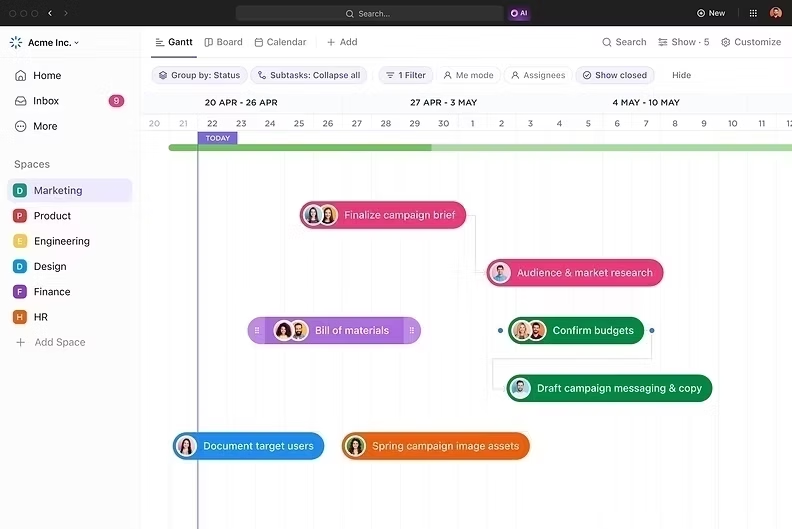
ClickUp Gantt View shows your tasks and milestones on a visual timeline. You can draw dependency lines between tasks to show which work must finish before something else can start.
How It Helps With Product Delivery
You can see your entire product plan from start to launch on one screen. If design is delayed by three days, dependent tasks shift too, so you can see exactly how it affects your milestones. ClickUp can also highlight the critical path, the chain of tasks that directly controls your launch date. Learn more about the role of Gantt charts in effective scheduling.
My Tip
Check your Gantt View every Monday. Look only at the next milestone and its dependencies. Small, regular checks prevent big surprises.
3. ClickUp Goals
What It Is
ClickUp Goals let you set clear targets and track them with measurable results. Each goal can be linked to tasks, numbers, or true/false targets, and progress updates automatically as work gets done.
How It Helps With Product Delivery
Set a goal like "Launch MVP by March 31" and connect it to the tasks and milestones that lead there. As your team completes work, the progress bar fills up on its own. Leaders and team members can see how close you are without asking for updates. It keeps everyone connected to the bigger purpose. This pairs nicely with strong goal tracking habits.

My Tip
Create one goal per major milestone. Seeing five progress bars fill up over time is a huge motivation boost for your team.
4. ClickUp Dashboards
What It Is
ClickUp Dashboards are custom real-time dashboards where you add cards like charts, progress bars, task lists, and workload views. Each card pulls live data from your product work.
How It Helps With Product Delivery
Build a "Product Delivery" dashboard showing milestone progress, overdue tasks, work by team member, and tasks completed this week. Product managers spot bottlenecks early. Leaders see the big picture in seconds. The team sees the progress they are making. Everyone looks at the same truth.

My Tip
Add a card that shows only overdue tasks linked to the next milestone. Make it the first thing your product lead checks every morning.
5. ClickUp Brain (AI)
What It Is
ClickUp Brain is the AI built into ClickUp, and the heart of AI project management in your workspace. It understands your tasks, docs, and comments, so you can ask questions in plain language and get answers from your real data.
How It Helps With Product Delivery
You can ask Brain, "What is blocking the Beta milestone?" or "Write a status update for the MVP milestone." It can break a product idea into milestones and tasks, summarize long product discussions, draft release notes, and write weekly progress updates for clients and leadership. For busy product managers, this saves hours every single week.

My Tip
Every Friday, ask Brain for a one paragraph update on each active milestone. Share it with your stakeholders. It takes two minutes and builds a lot of trust.
If you want to learn more about ClickUp and Product Development, you can connect with ME on LinkedIn.
How ClickUp Compares With Other Tools
I always want you to know your options, because every team is different. Jira is very strong for software teams that run sprints and track bugs, but it can feel technical and heavy for designers, marketers, and business stakeholders. Asana is clean and easy, with good timelines and milestones, though advanced features like detailed dependencies and reporting often need higher plans. Monday.com offers colorful boards and simple timelines, but costs can grow quickly as your team and needs grow. Smartsheet and Wrike are solid for detailed Gantt planning, yet they can feel complex for smaller product teams. Dedicated roadmap tools like Productboard and Aha! Roadmaps are great for product strategy and feature planning, but they are costly and usually separate from where the daily work happens.
ClickUp brings the best of all these together in one place: milestones, Gantt charts, dependencies, goals, dashboards, docs, chat, and built in AI, all connected to the rest of your team's work, and ClickUp pricing fits growing teams. That is why, after every comparison, it is my top recommendation.
Here is the full Comparison of ClickUp with other tools.
A Simple Way to Get Started in ClickUp
If you want to speed up your product delivery this month, here is a quick plan:
Create a List for your product, or start from ready made ClickUp templates.
Add five to eight tasks and mark them as Milestones.
Add a definition of done checklist inside each milestone.
Break each milestone into smaller tasks and assign owners.
Open Gantt View and connect tasks with dependencies.
Create a Goal for your launch and link it to your milestones.
Build a Dashboard showing milestone progress and overdue tasks.
Ask ClickUp Brain for a weekly milestone update every Friday.
You can set this up in one afternoon. And from that day on, your team will always know where they are and what comes next.
Conclusion
Slow product development is rarely about lazy teams or weak skills. Most of the time, it is about a missing map. When the only target is a far away launch date, teams lose focus, scope grows, problems hide, and "almost done" becomes a permanent status. I saw this with my client, and I have seen it in many teams since.
The fix is not longer hours or more meetings. The fix is milestone-based planning: clear checkpoints, clear owners, and a clear definition of done. Milestones turn a long, tiring journey into a series of small, visible wins. AI makes it smarter by helping you plan, predict delays, summarize decisions, and write updates in seconds.
There are many good tools out there, and each one has its strengths. But if you want everything in one place, from the first idea to the final launch, with AI built in, I truly believe ClickUp is the best choice for most teams.
Start small. Pick your next product goal. Break it into five milestones. Give each one an owner and a date. Let AI handle the reporting. And the next time someone asks, "When will it be ready?", you won't say "almost done." You will say, "Three milestones down, two to go, and here is the date."
Ready to stop saying "almost done" and start delivering on time? Let's build a milestone plan that gets your product to launch faster.
👉 Book a free session with me and I'll help you set up ClickUp for faster, milestone-based product delivery.


Comments