Team Burnout Rising? Visualize Workloads to Optimize Assignments

When Hard Work Starts Becoming Too Much
Every successful project depends on the people behind it. Teams work hard to meet deadlines, solve problems, and deliver quality results. But when work keeps increasing and responsibilities are not shared fairly, even the most dedicated employees begin to feel overwhelmed.
Burnout doesn't happen overnight. It starts with longer working hours, constant pressure, missed breaks, and too many tasks assigned to the same people. At the same time, other team members may have extra capacity but remain underutilized because managers don't have a clear picture of everyone's workload.
This is where workload visualization becomes essential.
Instead of guessing who is busy and who is available, managers can see workloads in real time, balance assignments, and keep projects moving smoothly. With the help of Artificial Intelligence (AI), workload management becomes even smarter by predicting overload, recommending task distribution, and helping teams stay productive without sacrificing employee well-being.
Among today's project management platforms, ClickUp stands out by combining AI, Workload View, task management, dashboards, and automation in one place. It helps organizations optimize assignments, reduce burnout, and improve collaboration across every department.
In this article, I'll explain why workload visualization matters, how AI is changing workforce management, and why ClickUp is my preferred solution for building healthier, more productive teams.
What Is Workload Visualization?
Workload visualization is the process of displaying how work is distributed across a team. Instead of relying on assumptions or spreadsheets, managers can clearly see who is overloaded, who has available capacity, and where adjustments are needed. This visibility helps create balanced workloads, improve productivity, and reduce stress.
AI-powered workload visualization goes a step further by analyzing project data, identifying workload trends, and recommending smarter task assignments before problems occur.
Why Workload Visibility Matters
When managers can't see everyone's workload, assignments often become uneven. Some employees receive too much work, while others have time available. This imbalance can lead to burnout, delays, and lower team morale.
A visual workload dashboard helps managers:
Balance work fairly.
Prevent employee overload.
Identify available resources.
Improve project planning.
Deliver projects on time.
Instead of reacting to problems, teams can prevent them before they affect performance.
Common Signs of Team Burnout
Burnout doesn't always appear as exhaustion. It often develops gradually through declining motivation, slower progress, and increasing frustration. Recognizing these signs early helps organizations protect both employees and project outcomes.
Constant Overtime
When employees regularly work beyond office hours, it usually indicates an unbalanced workload rather than strong productivity.
Missed Deadlines
Too many responsibilities often result in delayed work, even when employees are highly skilled.
Reduced Quality
Overloaded teams are more likely to make mistakes, overlook important details, and produce lower-quality work.
Low Motivation
Employees who constantly feel overwhelmed may lose enthusiasm and become less engaged in their work.
Poor Collaboration
When people are under pressure, communication becomes difficult, and teamwork begins to suffer.
How AI Is Transforming Workload Management
Traditional workload management relied on manual planning and weekly meetings. AI has completely changed this approach by providing real-time visibility, predictive insights, and intelligent recommendations.
Instead of simply tracking work, AI helps managers make better decisions every day.
AI Identifies Overloaded Employees
AI continuously monitors assignments and highlights team members who may be carrying too much work. This allows managers to rebalance workloads before burnout affects productivity.
AI Recommends Better Task Distribution
Rather than assigning work manually, AI analyzes deadlines, priorities, skills, and workloads to recommend the best person for each task.
AI Predicts Project Risks
If workload imbalances are likely to delay a project, AI identifies these risks early so managers can take action.
AI Automates Routine Work
AI saves time by generating reports, summarizing meetings, updating task statuses, and sending reminders automatically.
Benefits of Visualizing Workloads
When managers can clearly see how work is distributed across their team, it becomes much easier to plan projects, assign tasks fairly, and prevent employee burnout. Workload visualization provides real-time visibility into team capacity, helping organizations improve productivity while ensuring no one is overloaded. With AI-powered insights, teams can make faster and smarter decisions that keep projects on track.
Balanced Work Distribution
Workload visualization helps managers assign tasks fairly by showing who has available capacity and who is already busy. This creates a balanced workload across the team and prevents employees from becoming overwhelmed.
Higher Productivity
When work is distributed evenly, employees can focus on completing their tasks efficiently. They spend less time managing stress and more time delivering high-quality results.
Prevents Team Burnout
Overloaded employees are more likely to experience stress and fatigue. Visualizing workloads helps managers identify potential burnout early and adjust assignments before it affects performance.
Better Resource Planning
Managers can use workload data to allocate people and resources more effectively. This ensures the right person is assigned to the right task at the right time.
Improved Collaboration
When workloads are visible to everyone, teams communicate better and support each other when needed. This creates a more collaborative and productive work environment.
Smarter Decisions with AI
AI analyzes workloads in real time, identifies bottlenecks, predicts resource issues, and recommends better task assignments. This helps managers make informed decisions quickly and keep projects moving smoothly.
How to Visualize Workloads to Optimize Assignments
Visualizing workloads helps managers see how work is distributed across the team, making it easier to assign tasks fairly and avoid employee burnout. Instead of relying on guesswork, teams can use real-time data to understand who is overloaded, who has available capacity, and where adjustments are needed. AI-powered project management tools make this process even more effective by providing intelligent recommendations and live insights.

Use a Workload View
A visual Workload View shows each team member's assignments, deadlines, and available capacity in one place. This helps managers quickly identify overloaded employees and redistribute work more evenly.
Set Priorities for Tasks
Not every task has the same level of importance. Assign priorities such as high, medium, or low so team members focus on the most important work first. This improves productivity and prevents unnecessary pressure.
Monitor Team Capacity
Regularly review each employee's workload to ensure assignments match their availability and skills. Balanced workloads improve efficiency and reduce the risk of burnout.
Use AI for Smarter Assignments
AI analyzes workloads, deadlines, and project priorities to recommend the best person for each task. It also identifies bottlenecks and predicts potential resource issues before they affect project timelines.
Track Progress in Real Time
Use dashboards and reports to monitor project progress and workload distribution continuously. Real-time visibility allows managers to make quick adjustments whenever priorities change.
Review and Adjust Regularly
Workloads change as projects progress. Review assignments frequently and redistribute tasks when needed to keep projects on schedule and ensure every team member has a manageable workload.
Why ClickUp Is the Best Platform for Workload Management
Managing workloads becomes much easier when all projects, tasks, people, and deadlines are connected in one workspace. ClickUp provides powerful workload management features that help organizations balance assignments, improve collaboration, and prevent employee burnout. Combined with AI, ClickUp enables managers to make faster and smarter decisions while keeping projects on track.
Workload View
ClickUp's Workload View provides a visual overview of every team member's capacity. Managers can instantly identify overloaded employees, redistribute work, and ensure assignments are balanced across the team.

ClickUp Brain
ClickUp Brain uses AI to summarize projects, answer questions, generate reports, recommend priorities, and identify potential bottlenecks. This helps managers spend less time analyzing data and more time supporting their teams.
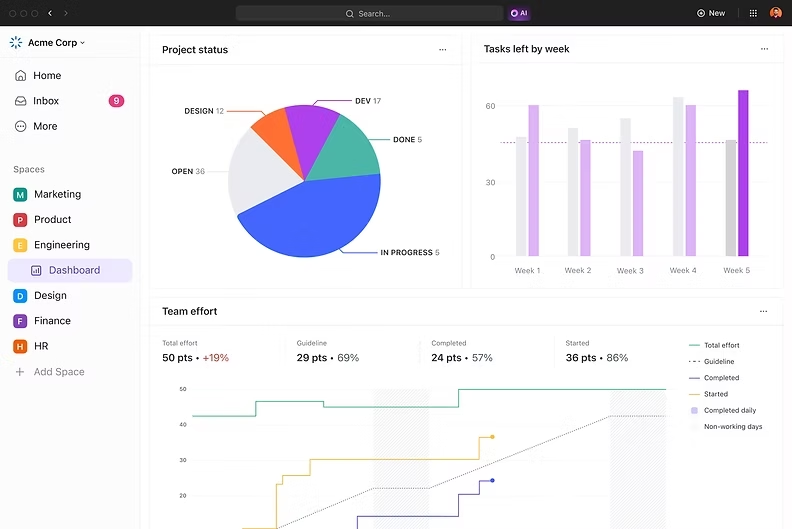
Dashboards
Custom dashboards display workloads, project progress, KPIs, and team
performance in real time, giving leaders complete visibility across projects.
Task Management
Tasks can be assigned with priorities, deadlines, dependencies, and custom statuses, making it easier to organize work and monitor progress.

Time Tracking
Built-in time tracking helps managers understand how time is spent, identify inefficiencies, and improve future planning.

Automations
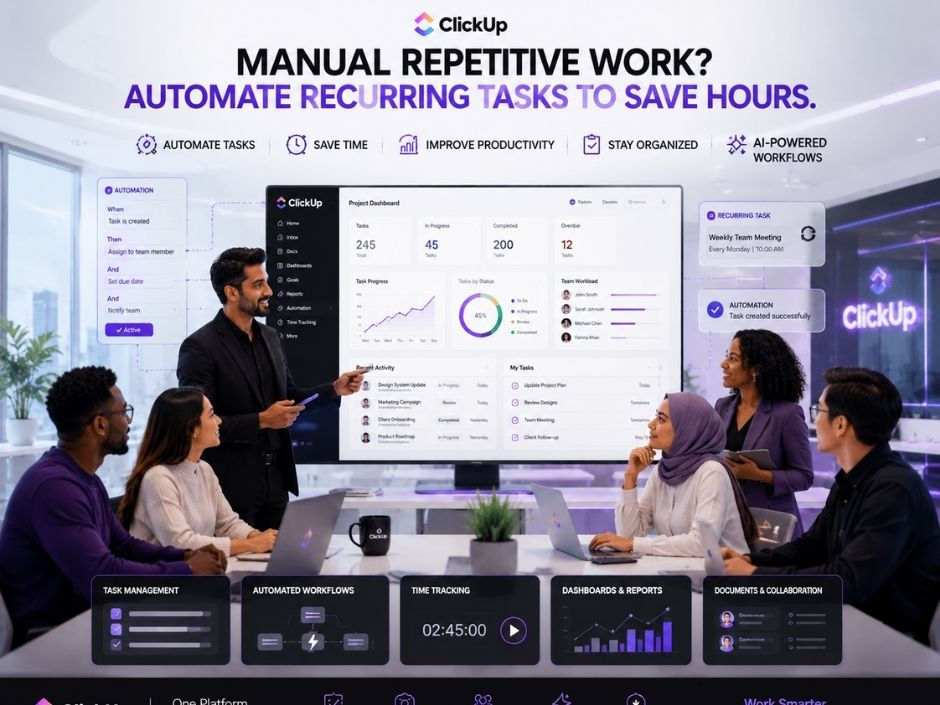
ClickUp automates repetitive work such as assigning tasks, updating statuses, sending reminders, and notifying team members about important changes.

Goals
Managers can connect workloads directly to business objectives, ensuring that every assignment supports the organization's larger goals.

Why I Recommend ClickUp
ClickUp combines workload management, AI, project planning, collaboration, reporting, and automation into one platform. Instead of using separate tools for planning, communication, and reporting, teams can manage everything from a single workspace, making work simpler, faster, and more organized.
If you want to learn more about ClickUp and Productivity Management, you can connect with ME on LinkedIn.
ClickUp Compared with Other Project Management Tools
Many project management platforms provide useful features for task management and collaboration. Some specialize in visual boards, while others focus on issue tracking or team communication. Depending on your needs, these tools can be effective for specific workflows.
However, many organizations eventually use multiple applications to manage projects, documents, reporting, communication, and workload planning. This increases complexity and reduces efficiency.
ClickUp brings these capabilities together in one AI-powered platform. It combines Workload View, project management, dashboards, goals, documents, automation, time tracking, collaboration, and ClickUp Brain to help teams manage work more effectively. Its flexibility makes it suitable for startups, agencies, enterprises, educational institutions, NGOs, marketing teams, HR departments, and product teams.
While other platforms have their strengths, ClickUp offers one of the most complete solutions for organizations that want to improve productivity, balance workloads, and reduce burnout.
Here's the full Comparison of ClickUp with other tools.
Conclusion
Burnout is not caused by hard work alone—it often results from unbalanced work. When managers can clearly see workloads, they can distribute tasks fairly, improve collaboration, and create a healthier work environment.
AI-powered workload management takes this a step further by providing real-time insights, predicting resource challenges, and automating repetitive tasks. This allows teams to stay productive without becoming overwhelmed.
For organizations looking to improve efficiency while supporting employee well-being, ClickUp is my top recommendation. Its powerful Workload View, AI capabilities, dashboards, automation, and collaboration features help teams stay balanced, focused, and aligned with their goals.
The best teams don't just work harder—they work smarter, together.
If you're ready to optimize assignments, reduce burnout, and transform the way your team works, IT SARKAR is here to help.
Ready to build a healthier, more productive team? Book a strategy session today and see how AI, ClickUp, and smarter workload management can optimize assignments, reduce burnout, and help your projects succeed.


Comments